

Key Takeaways
- SaaS conversion problems often start with traffic quality and search intent, not page design.
- Qualified visitors need clear messaging, relevant proof, and conversion paths matched to their buying stage.
- More traffic or form submissions do not guarantee more pipeline if the audience or lead quality is weak.
- Accurate GA4, CRM attribution, and sales handoff are essential for measuring which website activities create pipeline.
- Audit the funnel from traffic to CRM, then prioritize fixes by pipeline impact and implementation effort.
What a SaaS Website Conversion Audit Actually Examines
A SaaS website conversion audit examines the full path from search intent to sales pipeline, not just what happens after someone lands on a page. It looks at whether the right visitors are arriving, whether the page meets their needs, whether the conversion action aligns with their level of intent, and whether the resulting lead can be tracked into the pipeline.
That makes it broader than a conventional UX audit or page-level CRO review. A UX audit may focus on navigation, usability, layout, accessibility, and interface friction. Traditional SaaS conversion rate optimization often goes further by examining headlines, CTAs, forms, proof, and conversion behavior. Those checks matter, but they can miss the largest source of failure: traffic that was unlikely to convert in the first place.
A complete SaaS website conversion audit therefore follows four layers in sequence. Each transition creates a potential leak between visibility, website engagement, lead generation, and sales pipeline.
The Four Layers of a Conversion Audit
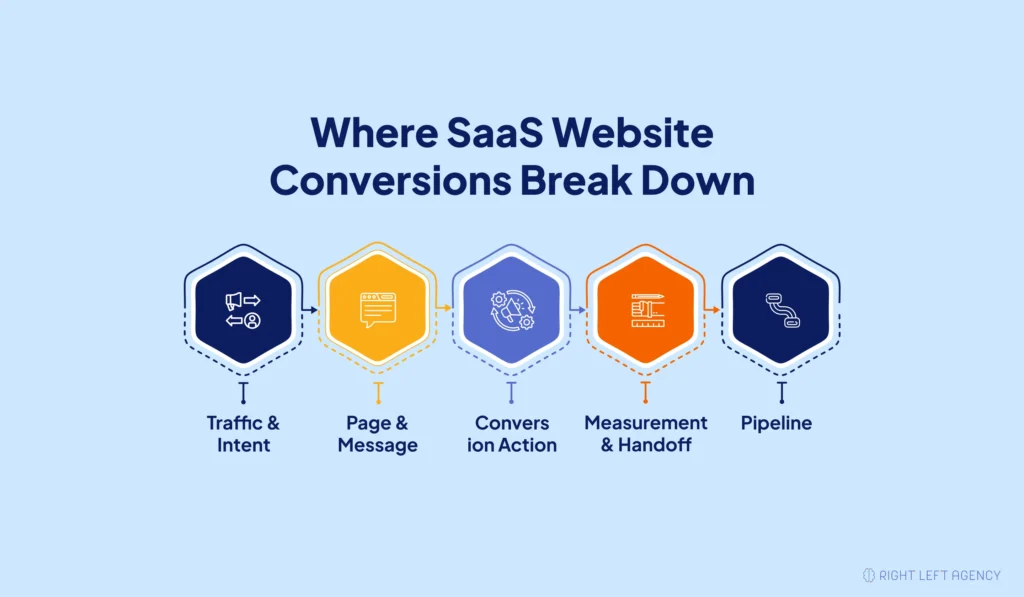
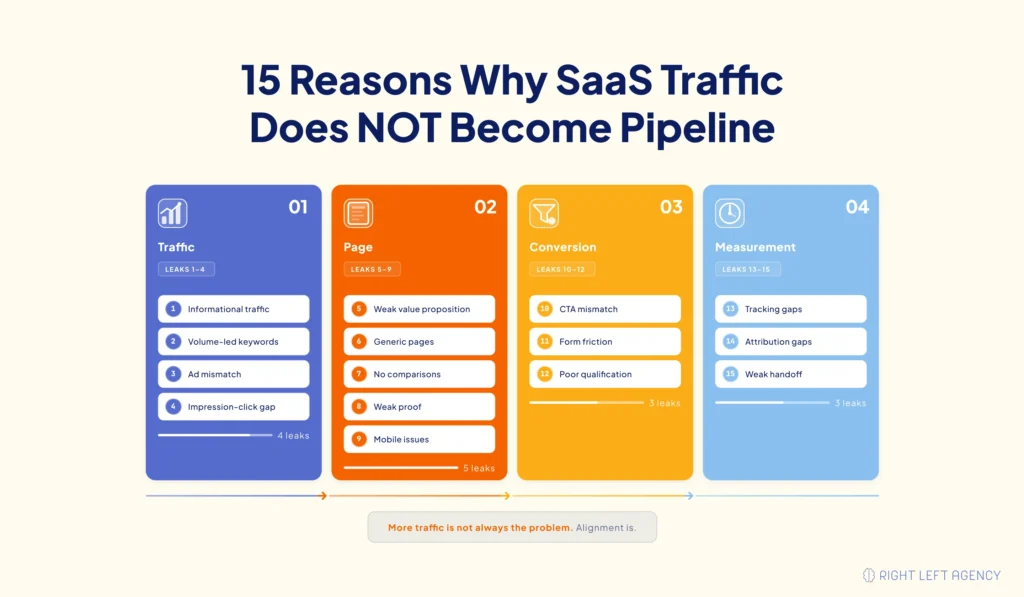
Traffic and intent determine whether visitors arrive with a realistic reason to enter a buying process. Reasons 1–4 examine informational queries, keyword portfolio composition, paid campaign message match, and search impressions that do not convert into meaningful website sessions.
Page and message determine whether the right visitor immediately recognizes that the page addresses their problem, use case, or desired outcome. Reasons 5–9 examine value proposition, use-case coverage, comparison content, proof density, and mobile performance on commercial pages.
The conversion action determines whether the next step matches visitor readiness without creating unnecessary friction. Reasons 10–12 examine CTA commitment, form structure and field order, and the balance between generating more submissions and qualifying leads that can become pipeline.
Measurement and handoff determine whether a website conversion can be connected to a CRM record and advanced by sales. Reasons 13–15 examine conversion tracking, website-to-CRM attribution, and whether sales receives the context already captured before the first conversation.
Why Most SaaS Conversion Failure Starts Upstream
Most SaaS conversion failure starts upstream because a page cannot create commercial intent that was missing when the visitor searched or clicked.
A visitor researching a general problem is fundamentally different from a buyer evaluating solutions. Both can increase traffic, but they do not carry the same pipeline potential.
That is why SaaS SEO and AI visibility should be evaluated by more than rankings and sessions. Search intent determines who arrives, and that audience composition sets the conversion ceiling before page-level optimization begins.
How to Audit Your Sales Funnel for Conversion Issues
A SaaS sales funnel audit should move from traffic acquisition to page behavior, conversion actions, and finally CRM pipeline. Running the audit upstream first helps you avoid fixing pages or forms before confirming that the visitors reaching them have enough commercial intent to convert.
Using the four layers above, run these diagnostic passes in order:
- Audit traffic and intent with Google Search Console. Review the queries generating impressions, clicks, and sessions, then classify them by search intent. Compare informational and commercial queries with the pages they reach. If traffic growth comes mainly from research-focused searches, the conversion problem may begin before the website experience.
- Audit pages and messages with Google Analytics 4 (GA4). Focus on commercial landing pages and check whether visitors continue engaging after arrival. Compare landing-page behavior, exits, scroll depth, and important interactions. This pass shows whether qualified visitors are reaching the right page but failing to see enough relevance to progress.
- Audit the conversion action with GA4. Examine CTA clicks, form_start, form_submit, and device-segmented conversion behavior. This helps separate a messaging problem from CTA commitment, form friction, field order, or mobile issues that prevent interested visitors from completing the next step.
- Audit measurement and handoff in your CRM. Compare website conversions with records in HubSpot, Salesforce, or your CRM. Verify that source, landing page, conversion action, and qualification context survive into the sales process. If analytics and CRM numbers disagree, fix measurement before concluding page performance.
The order matters because an upstream problem limits everything downstream. Mapping each finding against the B2B SaaS customer journey also helps determine whether the page and CTA match the visitor’s buying stage.
A finding should be supported by evidence. “The page feels weak” is an opinion. “Commercial-intent visitors reach the page but consistently leave before interacting with the CTA” is a diagnostic finding.
The Diagnostic Index
| Symptom | Likely Layer | Reason |
|---|---|---|
| Traffic rises, but demos stay flat | Traffic and intent | #1 |
| Rankings grow without pipeline growth | Traffic and intent | #2 |
| Paid clicks arrive but do not progress | Traffic and intent | #3 |
| Impressions rise while sessions stay flat | Traffic and intent | #4 |
| Buyers cannot quickly see product relevance | Page and message | #5 |
| Different use cases reach one generic page | Page and message | #6 |
| Buyers compare you on other websites | Page and message | #7 |
| Visitors reach the CTA without enough proof | Page and message | #8 |
| Commercial pages underperform on mobile | Page and message | #9 |
| CTA clicks do not become completions | Conversion action | #10 |
| Forms start but remain unfinished | Conversion action | #11 |
| Lead volume rises, but pipeline does not | Conversion action | #12 |
| GA4 and CRM conversions disagree | Measurement and handoff | #13 |
| Opportunities cannot be traced to pages | Measurement and handoff | #14 |
| Sales repeats qualification on the first call | Measurement and handoff | #15 |
Layer 1 — Traffic and Intent: Why the Wrong Visitors Never Convert
A large share of SaaS conversion problems starts before the visitor reaches the website. If keyword and campaign choices attract people with weak commercial intent, no headline, CTA, or form change can fully fix the problem.
1. You Rank for Informational Queries That Cannot Convert
Informational traffic can grow without increasing demos because search intent limits conversion potential.
Someone looking for a guide or definition is less likely to enter a sales conversation than someone evaluating solutions.
Confirm it in Google Search Console by segmenting queries by intent and comparing them with the landing pages receiving that traffic.
2. Your Keyword Portfolio Was Built for Volume, Not Commercial Intent
A SaaS site can grow traffic while attracting too little commercial demand.
Unlike Reason #1, this is about the overall keyword mix. If most sessions land on educational content instead of solution, use-case, or comparison pages, traffic growth may not translate into pipeline.
Compare organic sessions across commercial versus informational pages to see the split.
3. Your Paid Campaigns and Landing Pages Don’t Match on Message
Paid traffic leaks when the ad promises one thing, and the landing page communicates another.
That mismatch creates uncertainty and wastes commercially relevant clicks.
Pull your highest-spend ads and check them against the destination page’s H1, offer, and CTA. Strong paid search message match should make the transition feel continuous.
4. AI Search Is Producing Impressions That Never Become Sessions
AI search can increase visibility without producing equivalent website traffic.
RLA’s Google Search Console data shows one page averaging position 6.9 across 295,246 impressions with only a 0.08% click-through rate (CTR).
AI Mode and AI Overviews impressions are included in standard Web reporting, while the dedicated Generative AI report provides impressions without clicks, CTR, or query data.
Compare impression growth with landing-page sessions. If visibility rises but sessions do not, investigate the click gap before blaming website conversion.
Layer 2 — Page and Message: Why the Right Visitors Still Leave
Once qualified visitors arrive, the page must establish relevance quickly. Many SaaS pages focus too heavily on product features instead of showing buyers how the solution fits their problem, use case, or desired outcome.
5. Your Value Proposition Doesn’t Let the Buyer Place Themselves
A weak value proposition makes buyers work too hard to understand who the product is for and why it matters.
Feature-led messaging often explains the software without connecting it to the buyer’s situation.
Scroll depth and exit rate on commercial pages will show whether this is happening. The first screen should make the buyer’s problem and desired outcome clear.
6. You Have No Use-Case or Solution Pages, So Everyone Lands on Generic Ones
One generic page cannot speak equally well to multiple buyer situations.
If different industries, roles, or use cases all reach the same page, qualified visitors may struggle to see how the product fits their needs.
Look at how many distinct commercial query clusters land on one URL. Dedicated pages can help close conversion gaps on your website.
7. You Have No Comparison or Alternatives Pages, So the Comparison Happens Elsewhere
Buyers will compare products whether your website supports the process or not.
Without comparison pages, competitors and third-party sites control the narrative during a high-intent stage of the buying journey.
Check Google Search Console for branded-plus-competitor, “alternative,” “versus,” and comparison queries with no matching page.
8. Your Proof Isn’t Present Where the Decision Is Made
Proof should appear close to the CTA, not only on a separate case studies page.
Named clients, quantified outcomes, and attributed testimonials help reduce uncertainty before a buyer books a demo or contacts sales.
Audit commercial pages to see whether relevant proof appears before or near the conversion action.
9. Your Mobile Experience Breaks on Commercial Pages Specifically
Commercial pages can perform poorly on mobile even when the overall site looks responsive.
Forms may become awkward, proof may be buried, and CTAs may lose prominence.
Device-segmented conversion rates for commercial URLs will surface this. Compare desktop and mobile performance for the same demo, contact, pricing, or trial actions.
Layer 3 — The Conversion Action: Why Interested Visitors Don’t Complete
Conversion actions fail when they ask for too much commitment or focus on collecting more submissions instead of generating qualified pipeline.
10. Your CTA Asks for More Commitment Than the Visitor Is Ready to Give
A CTA should match the visitor’s buying stage.
“Book a Demo” may work for buyers comparing vendors but feels too aggressive for someone still exploring the problem.
Compare CTA click rate with form completion. High clicks followed by low completion often indicate a commitment mismatch.
11. Your Form Asks Too Much, Too Early, in the Wrong Order
Form friction depends on both field count and field order.
Even a short form can fail if the first questions feel difficult or intrusive.
Compare form_start with form_submit in Google Analytics 4, then review which questions appear first. Remove fields that create friction without improving qualification or routing.
12. You’ve Optimised for Capture When You Needed Qualification
More submissions do not automatically mean more pipeline.
Removing every qualifying field may increase conversion volume while giving sales more poor-fit leads to disqualify.
Reduce friction on fields that add no value, but keep the information needed to identify ICP fit and route leads correctly.
The goal is to generate MQLs that can become SQLs, not simply more form submissions.
Layer 4 — Measurement and Handoff: Why Leads Don’t Become Pipeline
The final layer breaks when website conversions cannot be reliably connected to CRM records and sales conversations. Leads may exist, but marketing cannot attribute them, and sales may lose the context already collected.
13. Your Conversion Tracking Is Broken or Incomplete
Tracking becomes unreliable when events fire incorrectly or fail to match actual CRM records.
A submit-button click, duplicate event, or missing conversion can distort performance data.
Compare GA4 conversions with CRM records for the same period. If the numbers disagree, fix tracking before concluding.
14. Nothing Connects Website Activity to CRM Pipeline
Without first-touch source, campaign, or landing-page data, marketing cannot tell which pages actually create pipeline.
That often leads to budget decisions based on traffic volume instead of opportunities.
A basic SaaS marketing attribution setup should preserve source, landing page, campaign, and conversion action in HubSpot, Salesforce, or your CRM.
15. Sales Starts From Zero on a Call the Website Already Qualified
Sales handoff fails when website context does not reach the rep.
If buyers already shared their problem, use case, or company details, they should not have to repeat everything on the first call.
Compare the information captured on the website with what sales can see before the conversation. Across your SaaS sales funnel stages, the rep should be able to continue qualification rather than restart it.
How to Prioritize These Fixes by Pipeline Impact
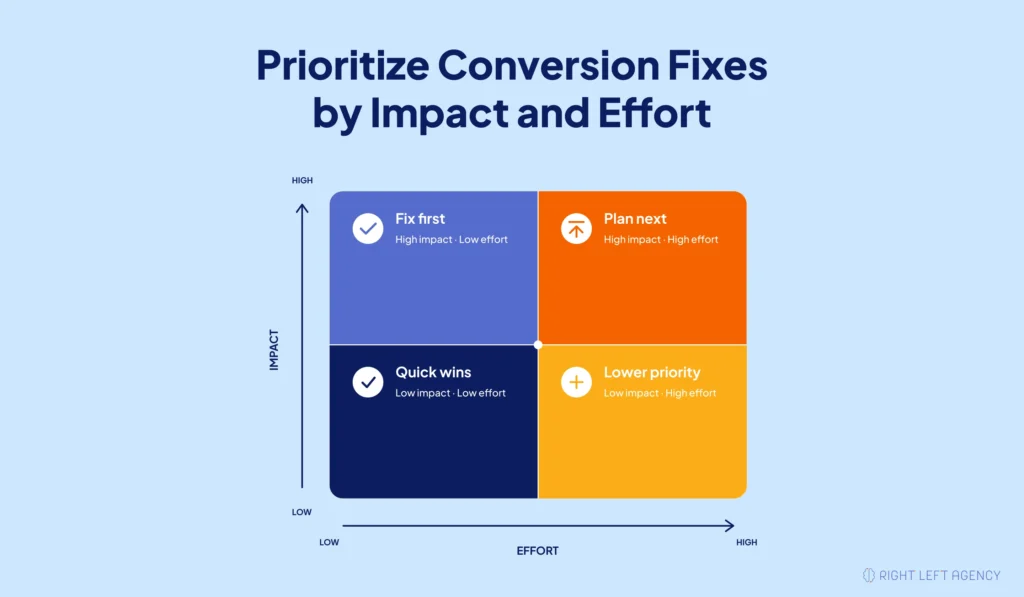
SaaS conversion problems should be diagnosed upstream to downstream but fixed according to pipeline impact and implementation effort. Diagnosis order and fix order are not the same, and treating the 15 reasons as a top-to-bottom implementation checklist can create unnecessary work.
Measurement problems often deserve early attention even though they appear in Layer 4. If GA4 events, CRM records, and attribution do not agree, you may have no reliable way to prove whether an upstream change improved pipeline.
Once measurement is trustworthy, prioritize confirmed problems using two dimensions:
- Pipeline impact: How much qualified pipeline could the problem be preventing?
- Implementation effort: How difficult is the confirmed solution to implement correctly?
High-impact, low-effort problems should generally receive attention before expensive structural work.
The main trap is fixing a downstream symptom while an upstream constraint remains unresolved. A better form cannot turn informational traffic into commercial demand. A stronger CTA cannot compensate for a landing page that receives the wrong audience.
| Reason | Pipeline Impact | Effort |
|---|---|---|
| Informational queries | High | Medium |
| Volume-led portfolio | High | High |
| Paid message mismatch | Medium | Low |
| AI impressions without sessions | Low | Low |
| Weak value proposition | High | Medium |
| Missing use-case pages | High | High |
| Missing comparison pages | Medium | Medium |
| Missing proof | Medium | Low |
| Mobile commercial-page issues | High | Low |
| CTA mismatch | Medium | Low |
| Form friction | High | Low |
| Capture vs. qualification | High | Medium |
| Tracking gaps | High | Low |
| Missing CRM attribution | High | Medium |
| Weak sales handoff | Medium | Low |
What This Looks Like in Practice
When PermitFlow, a construction-permitting SaaS platform, came to Right Left Agency, paid media was running but lead volume was inconsistent and qualified pipeline wasn’t keeping pace with spend.
The audit traced the leak to Page and Message and the Conversion Action: landing pages and lead forms weren’t converting qualified paid traffic into submissions sales could act on, confirmed by comparing paid traffic volume against qualified-lead conversion rates on landing pages. The root cause was landing pages and forms not built around lead quality, compounded by disconnected lifecycle tracking between Salesforce and HubSpot that made it hard to confirm which leads were actually qualified.
Right Left Agency applied its [framework name] to run coordinated Google and Meta paid media campaigns, rebuild landing pages and lead forms around qualified submissions, and clean up lifecycle tracking between Salesforce and HubSpot.
Within one month (July–August 2025), qualified lead volume increased 69%, with Meta-sourced leads up 89% over the same period, verified against PermitFlow’s CRM rather than platform-reported form submissions alone — a check that also confirmed Salesforce and HubSpot data agreed before the result was reported.
Read the full breakdown in the PermitFlow case study.
Request a SaaS Website Conversion Audit
Already getting traffic but not enough qualified pipeline? Right Left Agency can identify where the leak happens across traffic, pages, conversion actions, tracking, and sales handoff.
This audit is best for SaaS teams with existing traffic, analytics, and CRM data. It is not a substitute for product-market fit.
Request a SaaS Website Conversion Audit or explore SaaS conversion rate optimization.
Prefer to audit it internally? Download the 15-point checklist using your business email, company, and role.
Frequently Asked Questions
What is a SaaS website conversion audit?
A SaaS website conversion audit finds where qualified traffic stops becoming pipeline. It reviews traffic intent, page messaging, conversion actions, tracking, CRM attribution, and sales handoff. The goal is to identify the real problem before changing pages, forms, CTAs, or other parts of the website.
Why is my SaaS website getting traffic but not converting?
The problem usually sits in one of four layers: traffic and intent, page and message, conversion action, or measurement and handoff. An audit shows which layer is leaking so you can fix the real cause instead of simply adding more traffic or redesigning pages.
What is a good visitor-to-lead conversion rate for B2B SaaS?
First Page Sage reports a 1.9% visitor-to-lead benchmark for B2B SaaS. Treat it as a reference, not a target. Conversion rates vary by traffic source, audience, SaaS category, and how your company defines a lead.
How do I know if the problem is my traffic or my website?
Check the intent of visitors reaching your commercial pages. If most traffic comes from informational searches, traffic quality may be the problem. If commercial-intent visitors reach the right pages but still do not convert, investigate the page, message, CTA, form, and mobile experience.
Should I redesign my website or run a conversion audit first?
Run a conversion audit first if you do not know why the pipeline is underperforming. Redesign when the current site cannot support your messaging, commercial page structure, mobile experience, or conversion paths. Otherwise, a redesign may simply recreate the same problems with a new look.
How long does a SaaS conversion audit take?
Use the real delivery timeframe and briefly state what it includes. Do not estimate this based on competitor services or general CRO audits.
How do I connect website conversions to pipeline in my CRM?
Capture the source, landing page, campaign, conversion action, and relevant qualification data in your CRM. This gives marketing and sales enough information to trace a website visitor through lead creation, qualification, and opportunity stages.
Why did my impressions increase but my sessions stay flat?
More impressions do not always mean more website visits. AI Overviews and AI Mode can increase Search Console visibility without equivalent clicks. Compare impression growth with landing-page sessions before assuming your website has a conversion problem.