Key Takeaways
- Connect paid search data with CRM opportunities and closed-won deals.
- Measure qualified pipeline and acquisition costs, not just lead volume.
- Use offline conversion tracking to capture downstream sales outcomes.
- Account for long sales cycles and attribution limitations.
- Build reporting that supports better advertising investment decisions.
Your Google Ads dashboard shows a lower cost per lead, but are those leads becoming paying customers?
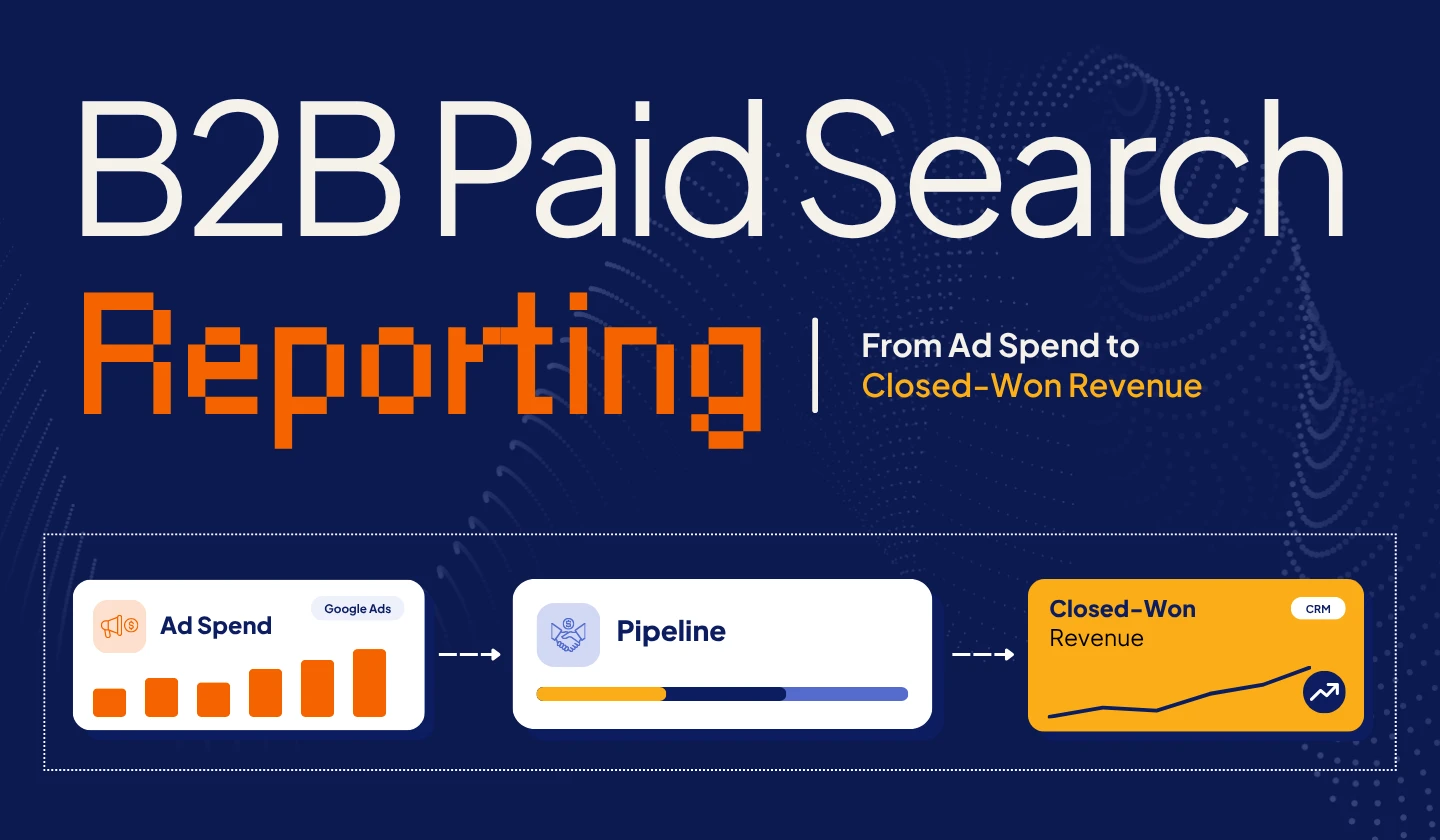
B2B paid search reporting connects ad spend to CRM data, sales opportunities, and closed-won revenue, so you can measure campaign performance beyond clicks and conversions.
This guide explains how to track revenue outcomes, improve attribution, and make better advertising decisions.
What Is B2B Paid Search Reporting?
B2B paid search reporting measures how advertising campaigns contribute to leads, sales opportunities, customers, and revenue.
Traditional PPC reporting focuses on metrics like clicks, impressions, cost per click (CPC), and website conversions.
Revenue-focused reporting connects those metrics with CRM and sales data to answer more important business questions:
- Which campaigns generate sales-qualified leads?
- How many advertising-generated leads become opportunities?
- Which campaigns contribute to closed-won deals?
- How much does it cost to acquire a customer?
- Does the revenue associated with paid search justify the investment?
Answering these questions requires reliable connections between advertising platforms, website tracking, CRM systems, and sales outcomes.
Traditional PPC Reporting vs. Revenue-Focused Reporting
| Traditional PPC Reporting | Revenue-Focused PPC Reporting |
|---|---|
| Clicks and impressions | Sales-qualified leads |
| Cost per click | Cost per qualified lead |
| Website conversions | Sales opportunities created |
| Cost per lead | Cost per opportunity |
| Conversion rate | Opportunity-to-customer rate |
| Platform-reported conversion value | CRM-attributed closed-won value |
Both approaches are important.
Traditional metrics help marketers understand campaign delivery and conversion performance. Revenue-focused metrics help determine whether advertising contributes to meaningful business results.
Effective B2B paid search reporting combines both perspectives.
Why Traditional PPC Metrics Don’t Show the Full Revenue Picture
A lower cost per lead does not necessarily indicate better advertising performance.
B2B buying decisions depend on several factors, including company size, industry, buying authority, budget, and product fit.
A campaign can generate inexpensive form submissions without attracting prospects who are likely to become customers.
Consider two hypothetical paid search campaigns.
| Metric | Campaign A | Campaign B |
|---|---|---|
| Advertising Spend | $5,000 | $5,000 |
| Leads Generated | 100 | 40 |
| Cost Per Lead | $50 | $125 |
| Sales-Qualified Leads | 10 | 20 |
| Opportunities Created | 3 | 8 |
| Closed-Won Customers | 1 | 3 |
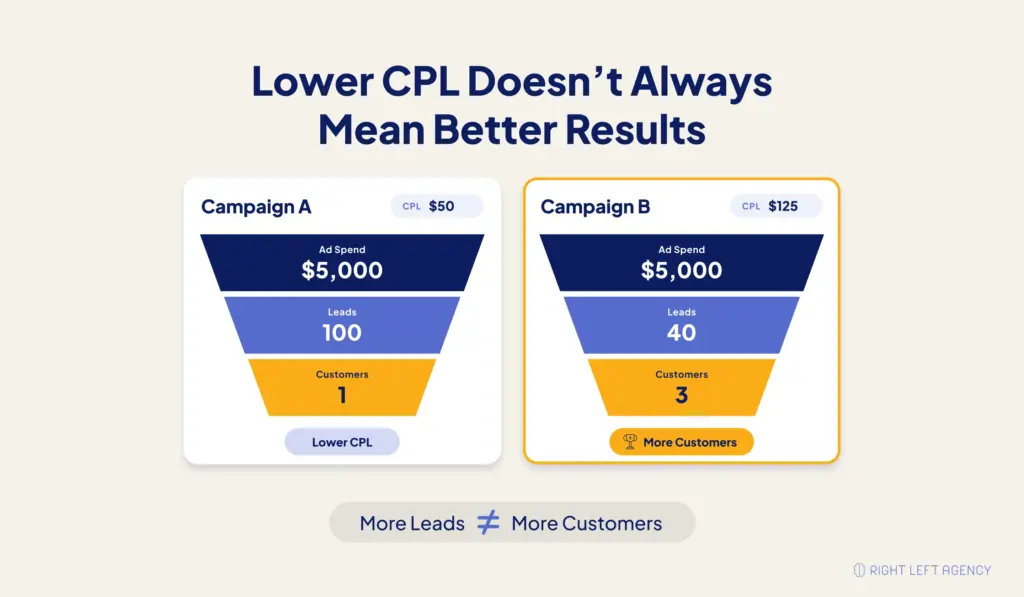
Campaign A appears more efficient based on cost per lead.
However, Campaign B generates twice as many sales-qualified leads and three times as many customers from the same investment.
Although revenue and profitability would require additional analysis, Campaign B demonstrates stronger downstream conversion performance.
The Problem With Optimizing for Form Submissions Alone
Advertising platforms optimize campaigns using the conversion signals they receive.
If form submissions are the primary conversion goal, automated bidding may prioritize users likely to complete forms rather than those most likely to become qualified customers.
For example, a student downloading a resource and a purchasing manager requesting a product demo may both appear as conversions.
Their commercial value is not necessarily equal. Connecting CRM qualification data to advertising platforms helps marketers distinguish early-stage engagement from meaningful sales outcomes.
How to Connect Paid Search Spend to Closed-Won Revenue
To connect paid search spending to closed-won revenue, define your sales funnel, capture advertising attribution data, connect leads to CRM opportunities, configure offline conversion tracking, and match won deals to their acquisition sources.
Regular validation helps ensure the resulting reports are reliable. The following six steps explain the process.
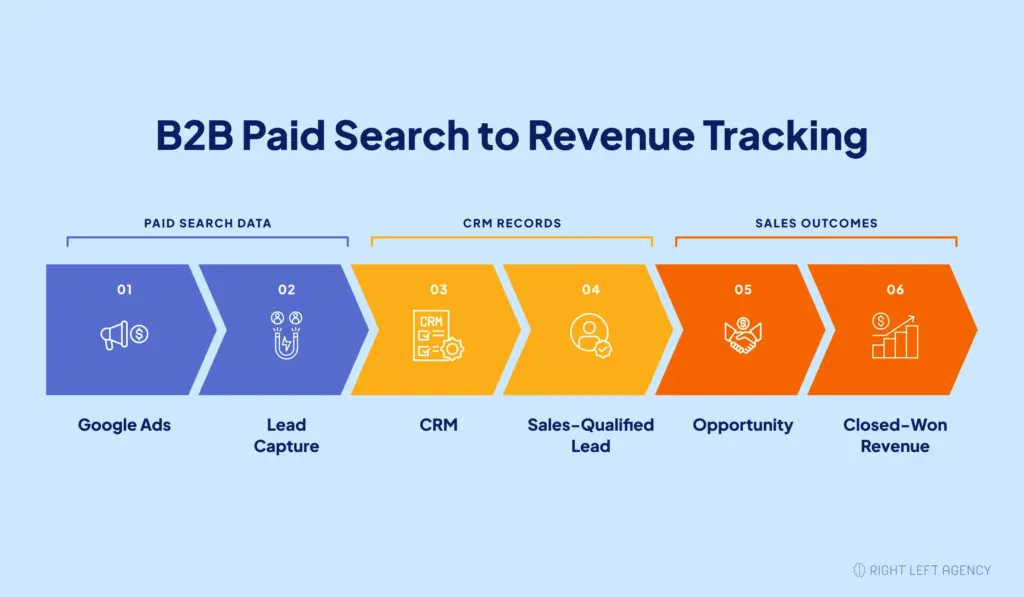
1. Define Your Lead-to-Revenue Funnel
Establish consistent CRM stages to track prospects from initial contact to closed-won deals.
A typical B2B funnel includes:
- Lead: Submits a form or requests a demo.
- MQL: Meets marketing qualification criteria.
- SQL: Meets sales qualification criteria.
- Opportunity: Becomes a potential deal.
- Closed-Won Customer: Completes a purchase.
Marketing and sales should agree on qualification criteria to maintain consistent reporting.
2. Connect Paid Search Campaigns to Your CRM
Connect Google Ads or Microsoft Advertising with CRM platforms such as HubSpot or Salesforce to track leads through the sales process.
Capture essential information, including:
- Contact and Account IDs: Identify prospects and organizations.
- Campaign Source, UTMs, and Click IDs: Track acquisition sources.
- Opportunity ID and Stage: Monitor sales progression.
- Deal Value and Close Date: Measure closed-won outcomes.
Ensure contacts, accounts, and opportunities remain connected, especially when multiple stakeholders are involved.
3. Capture Campaign Attribution Data
Preserve campaign information using UTM parameters and platform-specific identifiers such as Google Click ID (GCLID) and Microsoft Click ID (MSCLKID).
Your tracking setup should:
- Capture campaign information through landing pages and forms.
- Preserve original attribution data in the CRM.
- Record subsequent marketing interactions.
- Prevent duplicate records from overwriting attribution.
- Follow applicable privacy and consent requirements.
This helps identify paid search contributions even when prospects interact with multiple channels before converting.
4. Set Up Offline Conversion Tracking
Offline conversion tracking connects CRM sales outcomes with earlier advertising interactions.
Google Ads enhanced conversions for leads supports matching eligible CRM events using permitted first-party customer data.
Google recommends Data Manager for new offline conversion integrations, with API upload restrictions introduced in June 2026 for integrations without qualifying historical access.
A practical setup involves:
- Defining CRM conversion events.
- Creating separate conversion actions for relevant funnel stages.
- Capturing supported identifiers and customer data.
- Importing eligible CRM events.
- Validating matching and conversion accuracy.
Select primary conversion actions based on business objectives. Use secondary actions to monitor other stages without unnecessarily duplicating bidding signals.
5. Match Sales Opportunities to Closed-Won Deals
Connect advertising interactions with CRM contacts, accounts, opportunities, and closed-won deals.
This helps identify campaigns generating qualified pipeline and customers rather than leads alone.
Distinguish Closed-Won Bookings From Recognized Revenue
- Closed-Won Bookings: Total value of signed deals.
- Annual Contract Value (ACV): Annualized contract value.
- Recognized Revenue: Revenue recorded under applicable accounting policies.
Use consistent definitions when evaluating campaign performance and financial returns.
6. Validate Your Reporting Data
Regularly check for missing attribution fields, duplicate records, unmatched click identifiers, incorrect deal values, and failed conversion imports.
Recommended reporting frequency:
- Weekly: Campaign performance, leads, and tracking issues.
- Monthly: Opportunities, pipeline, and acquisition efficiency.
- Quarterly: Closed-won outcomes and customer acquisition economics.
Which B2B Paid Search Metrics Actually Matter?
Revenue-focused reporting should measure both lead quality and business outcomes.
| Metric | Formula |
|---|---|
| Cost Per Lead | Ad Spend ÷ Leads |
| Cost Per SQL | Ad Spend ÷ SQLs |
| Lead-to-SQL Rate | SQLs ÷ Leads × 100 |
| Cost Per Opportunity | Ad Spend ÷ Opportunities |
| Opportunity Win Rate | Won Deals ÷ Closed Opportunities × 100 |
| Cost Per Won Customer | Ad Spend ÷ Customers |
| Pipeline-to-Spend Ratio | Attributed Pipeline ÷ Ad Spend |
| Bookings-to-Spend Ratio | Attributed Bookings ÷ Ad Spend |
Also consider customer acquisition cost (CAC), customer lifetime value (LTV), and payback periods when evaluating profitability.
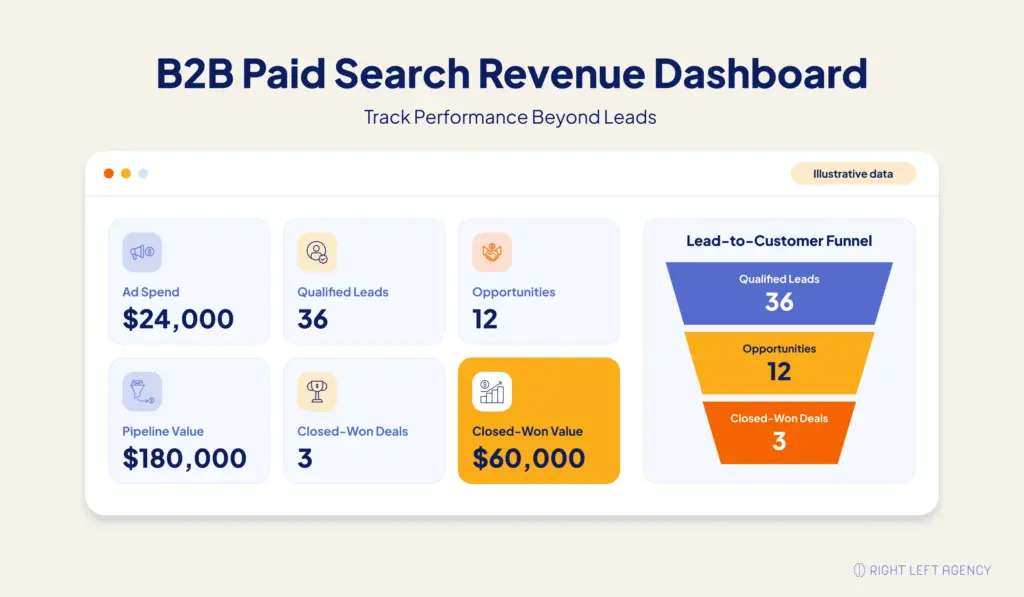
Example: What $24,000 in Paid Search Spend Generated
Consider a hypothetical B2B SaaS campaign:
| Performance Metric | Result |
|---|---|
| Ad Spend | $24,000 |
| Leads | 120 |
| SQLs | 36 |
| Opportunities | 12 |
| Pipeline Value | $180,000 |
| Closed-Won Customers | 3 |
| Closed-Won Bookings | $60,000 |
Assuming consistent campaign attribution, the results are:
- Cost per lead: $200
- Cost per SQL: $667
- Cost per opportunity: $2,000
- Cost per customer: $8,000
- Pipeline-to-spend ratio: 7.5:1
- Bookings-to-spend ratio: 2.5:1
The campaign generated $2.50 in attributed closed-won bookings for every $1 spent on advertising.
However, this ratio does not represent profit or true ROI. Acquisition costs, service delivery expenses, revenue recognition, and attribution limitations must also be considered.
How to Build a Revenue-Focused B2B Paid Search Dashboard
A useful B2B paid search dashboard should connect advertising activity with qualified pipeline and customer outcomes.
Rather than displaying every available marketing metric, organize the report around four reporting categories.
1. Advertising Performance
Track advertising spend, clicks, CPC, conversion rate, and CPL.
These metrics help identify changes in campaign delivery and website conversion performance.
2. Lead Quality and Pipeline
Include MQLs, SQLs, opportunities created, cost per opportunity, and attributed pipeline value.
This section shows whether paid search traffic is progressing into meaningful sales conversations.
3. Customer and Revenue Outcomes
Display closed-won deals, closed-won bookings, paid-media acquisition cost, and relevant revenue efficiency ratios.
Segment results by campaign, customer segment, or product where sufficient data exists.
4. Attribution and Data Quality
Monitor missing sources, unmatched conversions, duplicate records, and synchronization errors.
Include the attribution model, reporting date basis, and revenue definitions used.
A strong dashboard should help leadership understand what changed, why it matters, and which decisions the data supports.
What to Check When Google Ads and CRM Revenue Reports Don’t Match
Differences between advertising and CRM reports do not always indicate broken tracking.
Investigate these common causes:
- Different reporting dates: Google Ads may associate imported conversions with the original ad interaction, while CRM reports use the deal close date.
- Different attribution models: Advertising platforms and CRM systems may assign conversion credit differently.
- Conversion-window limits: Some late-stage CRM events may no longer qualify for import.
- Missing identifiers: Leads without usable matching information may not be connected to an advertisement.
- Multiple contacts per deal: Several advertising interactions may relate to one opportunity.
- Value discrepancies: CRM and advertising reports may use different deal values, currencies, or adjustments.
Start by comparing a small sample of opportunities across both systems.
Confirm the original lead source, click identifier, opportunity association, conversion event, attribution method, and deal value.
This is often more informative than comparing two aggregate revenue totals without examining the records behind them.
How to Handle Long B2B Sales Cycles and Revenue Attribution
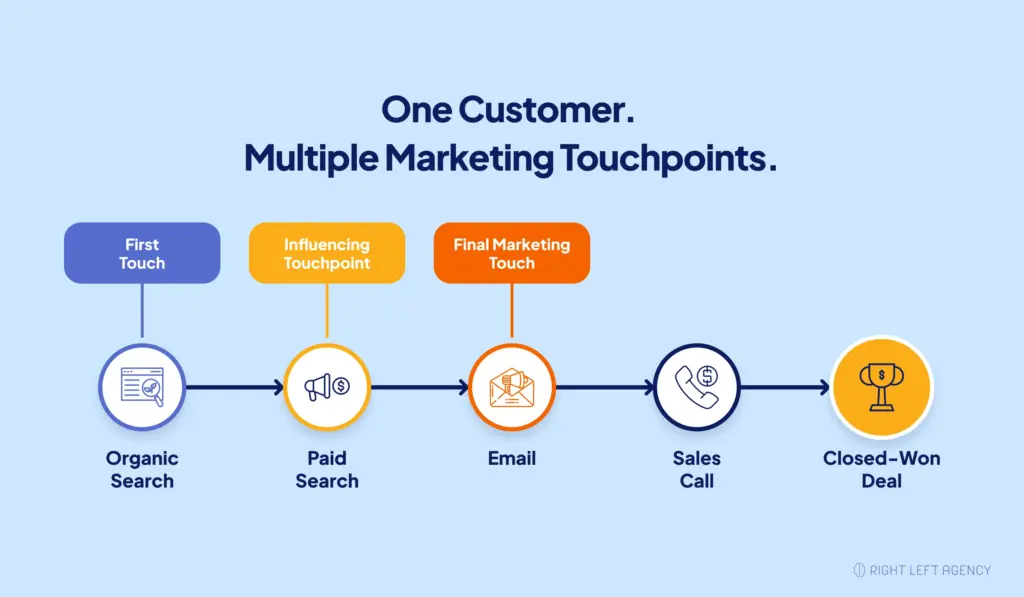
B2B buying journeys involve multiple stakeholders and touchpoints, making revenue attribution challenging. Accurate reporting requires consistent attribution models and consideration of sales-cycle delays.
Paid Search-Sourced vs. Paid Search-Influenced Revenue
- Paid search-sourced revenue: Revenue from customers whose original acquisition source is credited to paid search.
- Paid search-influenced revenue: Revenue from deals involving paid search interactions, even when another channel receives primary credit.
- Attributed revenue: Revenue assigned to paid search under a defined attribution model.
These values may overlap and should not be combined without accounting for duplicate credit.
First-Touch, Last-Touch, and Multi-Touch Attribution
- First-touch: Credits the first qualifying interaction.
- Last-touch: Credits the final qualifying interaction.
- Multi-touch: Distributes credit across multiple interactions.
Use consistent attribution rules. Remember that attributed revenue does not necessarily represent incremental revenue generated by advertising.
Account for Conversion Windows and Reporting Delays
Long sales cycles may exceed advertising platform conversion windows.
According to Google Ads documentation, offline conversions generally have a 90-day click-to-conversion limit, reduced to 63 days for enhanced conversions for leads.
Deals closing outside these limits can still be tracked through CRM reporting.
Use cohort analysis to evaluate:
- Lead cohorts: Grouped by acquisition date.
- Opportunity cohorts: Grouped by opportunity creation date.
- Closed-won cohorts: Grouped by deal close date.
Compare advertising spending with the appropriate acquisition cohorts rather than unrelated deals closed during the same month.
7 Common B2B Paid Search Reporting Mistakes
Even well-managed advertising campaigns can be evaluated incorrectly when reporting methods are inconsistent.
1. Measuring Lead Volume Instead of Lead Quality
More leads do not necessarily mean more qualified buyers. Track qualification rates and opportunity outcomes alongside CPL.
2. Tracking Website Conversions Without CRM Outcomes
Form submissions show early-stage interest but do not establish commercial value. Connect leads with opportunities and closed-won results whenever the data allows.
3. Using Inconsistent Attribution Models
Different attribution models can produce conflicting revenue totals. Document the selected model and avoid adding overlapping credited revenue together.
4. Comparing Current Ad Spend With Unrelated Closed-Won Deals
Deals closed this month may originate from campaigns launched several months earlier. Use acquisition cohorts and account for sales-cycle timing.
5. Confusing Pipeline Value With Revenue
An open opportunity represents potential business, not a completed sale. Report pipeline, bookings, and recognized revenue separately.
6. Ignoring Tracking Errors and Missing CRM Data
Incomplete attribution fields and duplicate records can distort campaign comparisons. Validate the data before reallocating advertising budgets.
7. Assuming Attribution Proves Incremental Revenue
Attribution assigns credit to marketing interactions but does not establish whether advertising caused the sale.
Where practical, use controlled experiments, incrementality testing, and broader business analysis to evaluate advertising’s additional contribution.
How to Use Revenue Reporting to Improve Paid Search Performance
Revenue reporting helps B2B marketers optimize campaigns based on qualified opportunities and business outcomes.
Prioritize Campaigns That Generate Qualified Opportunities
Compare SQL rates, opportunity conversion rates, and cost per opportunity. Higher CPL may be justified when campaigns attract better-qualified prospects.
Optimize Campaigns Using Downstream Conversion Data
Import eligible CRM conversion events to improve bidding signals. Choose conversion goals based on business value, sufficient conversion volume, and reporting delays.
Reallocate Budget Based on Revenue Evidence
Use mature acquisition cohorts, opportunity quality, and customer acquisition costs to guide budget decisions. Verify data reliability before making changes.
Improve Marketing and Sales Accountability
Align marketing, sales, and agency reporting around pipeline and revenue outcomes.
Our guide to paid search agency pricing explains common management models and reporting responsibilities.
Connect Paid Search Performance to Business Outcomes
Effective B2B paid search reporting connects ad spend with qualified leads, sales opportunities, and closed-won revenue to support smarter investment decisions.
At Right Left Agency, our paid search advertising approach combines campaign strategy, conversion tracking, and performance optimization to drive meaningful business outcomes.
Make Your Paid Search Reporting More Actionable
Explore Right Left Agency’s paid search services to improve reporting accuracy, identify growth opportunities, and make more informed advertising decisions.
Frequently Asked Questions
How do you measure paid search ROI in B2B marketing?
Measure B2B paid search ROI by connecting advertising investment with attributed customer revenue and relevant acquisition and delivery costs. Use CRM data to identify closed-won outcomes, apply a consistent attribution model, and distinguish recognized revenue from contract bookings.
Can Google Ads track closed-won revenue?
Yes. Google Ads can receive eligible offline conversion events from CRM systems through supported integrations. However, successful matching depends on identifier availability, conversion windows, and data quality. CRM-based reporting remains necessary for comprehensive sales-cycle analysis.
What is the difference between CPL and cost per opportunity?
Cost per lead divides advertising spend by leads generated. Cost per opportunity divides spend by attributed sales opportunities created. Cost per opportunity provides additional insight into how efficiently advertising generates potential deals rather than initial inquiries.
Which tools are needed for B2B paid search revenue reporting?
A typical setup includes Google Ads or Microsoft Advertising, website conversion tracking, a CRM such as HubSpot or Salesforce, and reporting tools such as Looker Studio or Power BI. Offline conversion integrations may also be required to connect advertising interactions with sales outcomes.
How do you attribute paid search revenue across long B2B sales cycles?
Preserve acquisition-source information in the CRM, connect contacts with opportunities, and apply consistent attribution rules. Use cohort reporting to evaluate customers acquired over longer periods, even when closed-won events fall outside advertising platform conversion windows.
How often should B2B paid search revenue reports be reviewed?
Review campaign delivery and tracking health weekly, pipeline generation and acquisition efficiency monthly, and mature customer cohorts quarterly. Reporting frequency should reflect sales-cycle length, conversion volume, and available data.
What if paid search generates opportunities but no closed-won customers?
Investigate opportunity quality, sales-cycle maturity, deal progression, pricing, and sales execution. Recent opportunities may not have had enough time to close. However, persistently low win rates can indicate problems with targeting, qualification, product fit, or the sales process.