

Key Takeaways
- Nothing changed is the wrong assumption.
- Rule out measurement before touching strategy.
- In GSC, read impressions, position, and CTR together, not clicks alone.
- Demand and competition can shift without you doing anything wrong.
- Match the fix to the actual break point.
The Real Question Isn’t “What Did We Change” — It’s “What Changed Around Us”
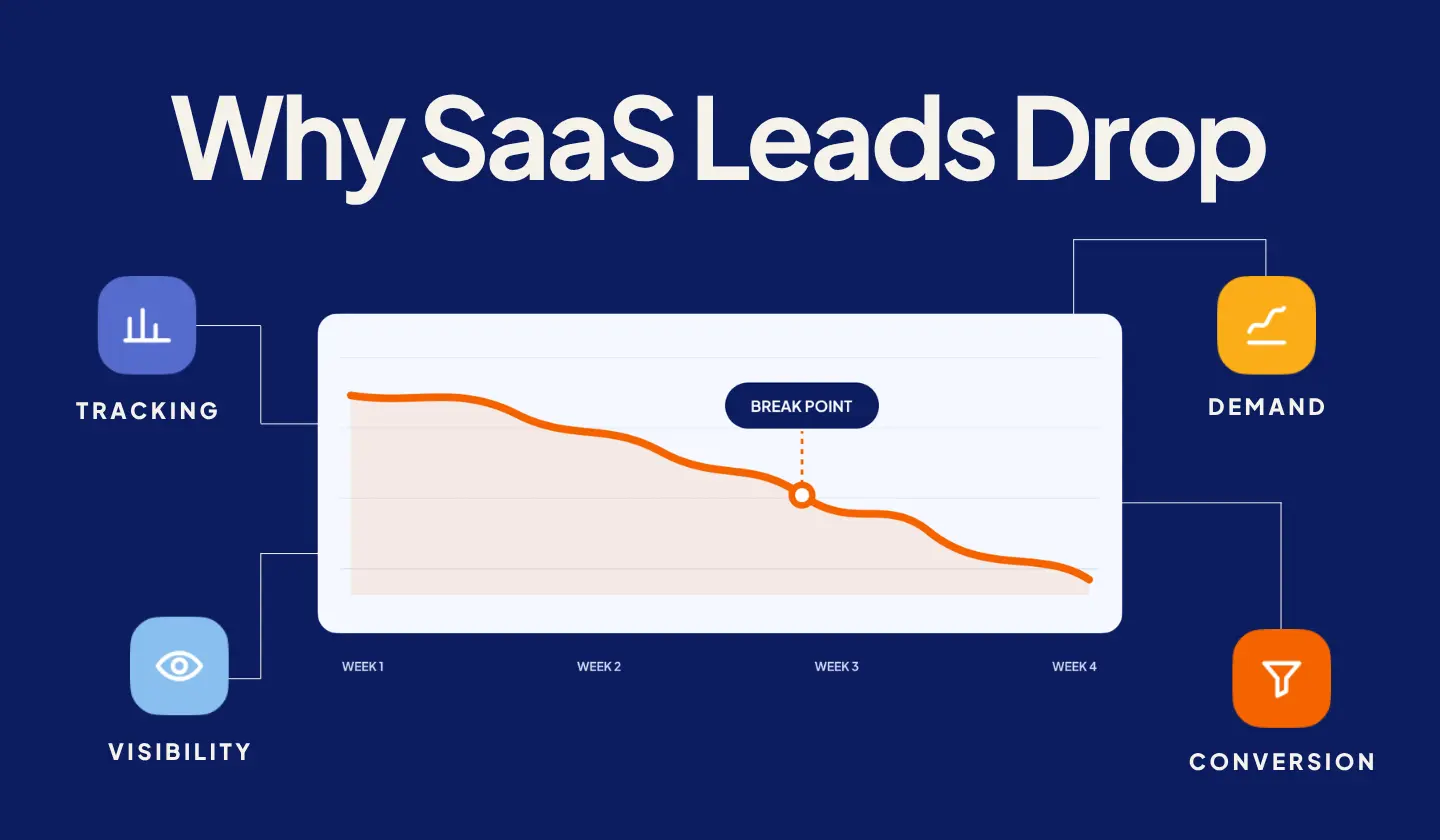
When SaaS inbound leads suddenly decline, investigate four areas first: measurement, search visibility, demand, and conversion.
Any of them can change without your marketing team intentionally changing its strategy. Your organic rankings could remain relatively stable while click-through rates fall. Search demand for an important category could decline. A CRM integration could stop recording conversions correctly. Or your traffic could remain healthy while fewer visitors convert.
That distinction matters, because each problem requires a different response. A measurement problem means leads may still exist but aren’t being recorded correctly. A visibility problem means fewer potential buyers are discovering your website. A demand problem means fewer buyers are actively looking for what you sell. A conversion problem means visitors are still arriving but aren’t becoming leads at the same rate.
There’s also a difference between a lead generation plateau and a sudden decline. A plateau usually means growth has stopped despite continued effort. A drop means performance deteriorated from an established baseline. Those situations can share causes, but the diagnostic process should start by identifying exactly when and where performance changed.
Instead of asking, “What should we change in marketing?” start with a better question: Where did the first meaningful change occur?
Step 1 — Confirm It’s Actually a Lead Problem, Not a Tracking Problem
Before auditing SEO, rewriting pages, or changing campaigns, confirm the decline exists outside your analytics tools. Tracking problems can make healthy lead generation appear broken.
Start by comparing what GA4 reports with what actually reached your CRM, sales team, inbox, or product database during the same period.
Review GA4 key events. Confirm that the events used to measure demo requests, trial signups, contact forms, or other important conversions are still firing correctly. Look for recent configuration changes around the date the decline started. A form submission can continue working for prospects while its GA4 event stops firing, creating an apparent conversion decline that doesn’t exist operationally.
Check the form-to-CRM connection. Submit your important forms yourself. Confirm that each submission reaches the expected confirmation page or message, appears inside the CRM, receives the correct lifecycle stage, retains the source where possible, and triggers any required routing or notifications. A broken integration can create a gap between website activity and the pipeline your marketing team sees.
Review Google Tag Manager changes. Check your GTM publishing history around the beginning of the decline. A seemingly unrelated tag update can affect conversion triggers, event parameters, attribution, or data collection — especially when multiple teams or external partners have publishing access.
Check consent and cookie configuration. Consent-management changes can also affect measurement. If consent mode, your cookie banner, or your analytics implementation recently changed, determine whether the decline appears across actual leads or only inside attributed analytics data.
The goal isn’t to blame tracking automatically. It’s to eliminate measurement as a cause before investing time and budget elsewhere. If attribution inconsistencies are already making it difficult to understand where pipeline comes from, a broader SaaS marketing attribution review may be necessary.
Once you know the decline is real, move to search visibility.
Step 2 — Check GSC for a Visibility Change
Google Search Console can show whether your organic lead decline began with fewer search impressions, weaker rankings, lower click-through rates, or problems affecting specific pages and queries.
Start with the Performance report. Compare the period when leads declined against a representative previous period. Depending on your business, comparing against the same period last year may also help account for seasonality.
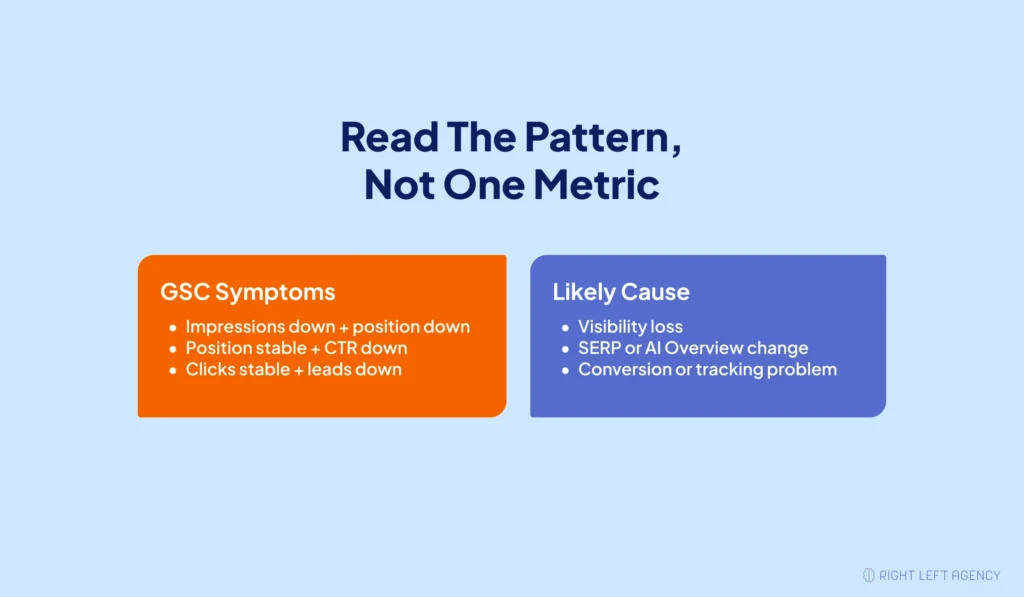
Focus on four metrics: impressions, clicks, average position, and CTR. Don’t look at total organic clicks alone — the relationship between these metrics tells you much more about what may have happened.
| What You See | Likely Direction to Investigate |
|---|---|
| Impressions down + average position down | Ranking or broader search-visibility loss |
| Impressions down + position relatively stable | Lower search demand, lost query coverage, or indexing issues |
| Position down on a small group of pages | Page-level competition, content decline, cannibalization, or technical issue |
| Position stable + impressions stable + CTR down | SERP change, AI-generated answer, or changing click behavior |
| Clicks and sessions stable + leads down | Conversion or measurement problem |
| Site-wide impressions suddenly fall | Indexation, technical SEO, migration, manual action, or significant visibility issue |
Next, determine whether the decline is site-wide or concentrated. If almost every important directory and query group declined together, investigate broader technical problems, indexing changes, or a significant search visibility shift. If only a handful of pages dropped, examine those pages individually: Did competing pages move above them? Did search intent change? Are two of your own pages competing for the same query? Did an important URL change? Were redirects implemented incorrectly? Did the page fall out of Google’s index?
Also check Google Search Console for manual actions and indexing problems. If a migration, redesign, CMS update, or URL restructuring happened recently, verify your redirects and canonical URLs before assuming an algorithm update is responsible.
Is an AI Overview or AI Mode Answer Absorbing Your Clicks?
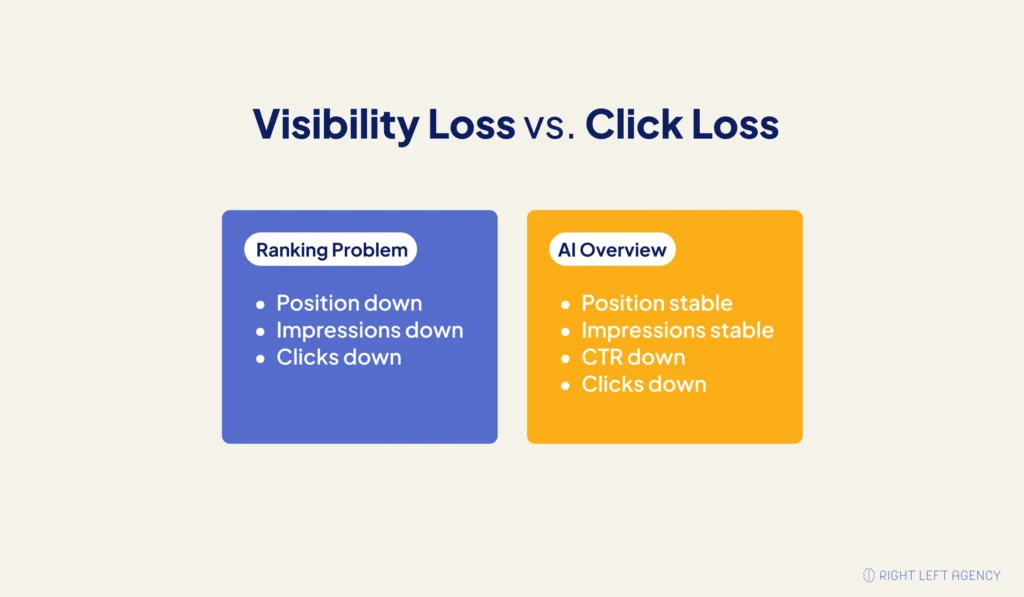
AI Overview absorption occurs when a searcher gets enough information directly inside Google’s AI-generated search experience that they have less reason to click the traditional organic result. One possible signal: your rankings and impressions remain relatively stable, but your organic CTR and clicks fall.
That pattern doesn’t prove AI Overviews caused the decline — search-result features, ads, competitor snippets, changing titles, and shifts in user behavior can also reduce CTR. But it gives you a reason to inspect the SERP itself.
Review the important non-branded queries that lost clicks. Search them manually and check whether Google now displays an AI Overview, an AI Mode experience, expanded featured answers, videos, or other rich results, additional paid placements, or new competitors with stronger SERP messaging.
The key is separating a ranking problem from a click problem. If your average position declined significantly, focus first on why visibility weakened. If your position held while CTR declined, the search result itself may have changed around you. That distinction prevents a SaaS team from responding to every organic traffic decline by simply publishing more content.
Step 3 — Check Whether Buyer Behavior or Demand Itself Shifted
Sometimes your SEO is working correctly, and your tracking is accurate, but fewer buyers are actively searching or researching the category in the same way. That’s a demand problem, not necessarily a marketing execution problem.
Compare against the same period last year. Month-over-month comparisons can create false alarms for SaaS companies with predictable buying cycles. Look at organic impressions, qualified leads, demo requests, branded searches, and opportunities created across multiple years where reliable data exists. If similar declines repeatedly happen during the same period, seasonal demand becomes a more plausible explanation.
Look at branded search. It’s one indicator of underlying market awareness and interest. If searches for your company and product remain stable while non-branded traffic falls, you likely have a category visibility issue rather than a demand issue. If both branded and non-branded demand weaken, investigate broader market conditions, awareness, competitive pressure, or changes in buying activity. No single metric should make the diagnosis — look for patterns across search and pipeline data.
Check whether a competitor changed the market. Your marketing may not have changed, but a competitor’s might have. A well-funded competitor can expand content production, paid search activity, comparison pages, category education, partnerships, and brand awareness — and that can affect you before your rankings dramatically collapse. Review your important commercial queries: Are new competitors appearing? Are established competitors occupying more SERP space? Have they launched stronger category or comparison pages? Are buyers increasingly searching for their brand? Are they positioning the problem differently? The real question isn’t “did someone outrank us” — it’s whether someone changed how buyers evaluate the category.
Consider where buyers are researching. B2B SaaS buyers don’t do their entire research process through Google. They may use peer communities, review platforms, LinkedIn, Reddit, YouTube, AI assistants, private communities, and colleague recommendations before visiting a vendor website. A change in that behavior can reduce traditional organic sessions even when interest in the underlying problem remains. This is why a search traffic decline shouldn’t automatically be read as declining market demand — check the rest of your acquisition system first.
Step 4 — Separate a Traffic Problem from a Conversion Problem
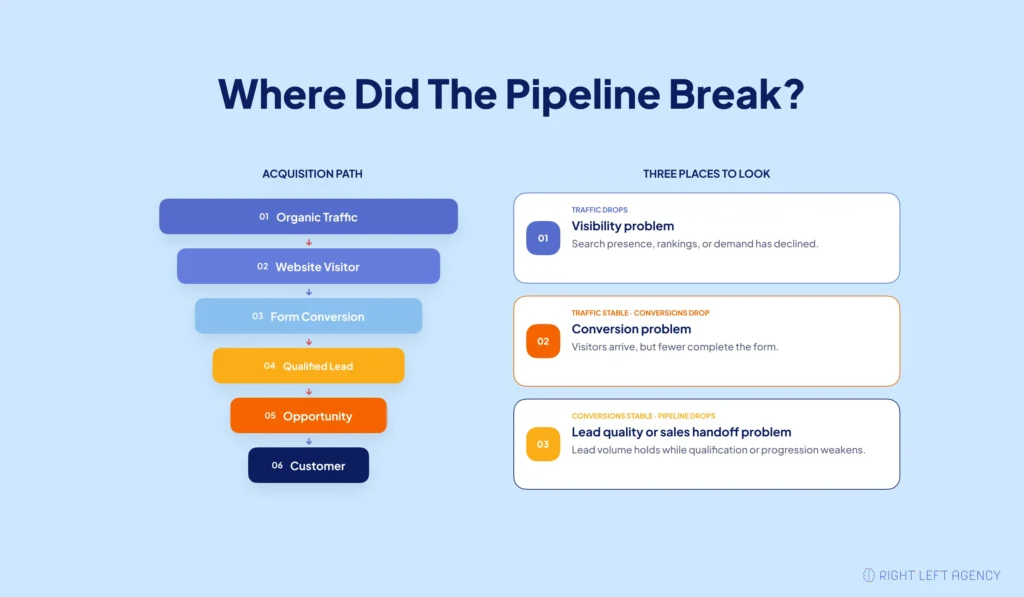
If your organic sessions remained relatively stable while inbound leads declined, search visibility probably isn’t the primary problem. The failure is more likely happening between the visit and the conversion — or between the conversion and your measurement system.
Calculate your conversion trend for the affected pages: organic leads ÷ organic sessions. Then segment that conversion rate by important landing page, device, traffic source, and conversion action where your data supports it. You may find that total traffic looks normal while a high-intent page is converting significantly worse.
Worth noting: a form submission is a conversion, not automatically a qualified lead. If raw conversion volume held steady but pipeline still shrank, the gap may sit downstream — in lead quality or sales handoff — rather than in the traffic or conversion numbers themselves.
Check whether anything changed around forms, CTA placement, page speed, mobile usability, messaging, pricing information, proof and credibility, navigation, traffic quality, or user intent. Traffic quality matters as much as traffic volume — losing 500 informational visitors may have almost no pipeline impact, while losing 50 visitors to a high-intent solution page might. So compare which traffic declined, not simply how much.
If your aggregate traffic looks acceptable but fewer visitors are becoming leads, the problem deserves a conversion-focused diagnosis rather than another traffic-generation campaign. Our SaaS website conversion audit guide covers the conversion-path issues to investigate when traffic has held steady, but leads haven’t.
What To Do Once You Know the Cause
Once you identify where the decline began, respond to that specific failure instead of changing everything at once.
If tracking is broken: fix measurement before making marketing decisions. Work with whoever owns your analytics, website, or CRM to restore reliable event tracking, form integrations, lifecycle stages, and source attribution. Then determine whether the historical decline was real or simply reporting noise. Don’t optimize marketing against data you don’t trust.
If organic visibility declined: identify whether the loss is technical, page-specific, query-specific, or site-wide. Depending on the diagnosis, the response might include correcting indexing or redirect problems, resolving keyword cannibalization, refreshing declining content, improving alignment with current search intent, strengthening internal linking, improving commercial pages, or rebuilding authority around strategically important topics. Publishing ten new articles won’t fix a broken canonical tag. If organic search is a meaningful pipeline channel and the decline needs a deeper recovery strategy, explore our SaaS SEO services.
If rankings held but CTR declined: examine how the SERP changed. If AI-generated answers or other SERP features now satisfy part of the query directly, competing solely for a traditional blue-link click may become less effective. Make important content easier for both people and search systems to understand — answer the core question immediately, structure sections around clear buyer questions, use concise definitions, strengthen original expertise and evidence, create comparison-friendly information, and connect informational topics clearly to the product problem you solve. The objective isn’t to manipulate AI systems — it’s to make your expertise clear, useful, and easy to retrieve while giving buyers a reason to continue to your site.
If category demand weakened: don’t try to SEO your way out of a market problem. Investigate whether the decline reflects seasonality, changing terminology, competitive pressure, a narrower addressable market, or buyers shifting toward different problems. You may need to adjust positioning, category language, target segments, messaging, demand generation, distribution channels, or competitive strategy. For growth-stage SaaS companies, search performance should ultimately be evaluated alongside pipeline rather than in isolation. Our SaaS marketing approach is built around that connection.
If traffic held but conversion declined: shift the investigation from acquisition to the buyer journey. Review what high-intent visitors see after they arrive and where they abandon the process. You may not need more traffic — you may need more of the traffic you already earned to understand the product, trust the offer, and take the next step.
The important principle across every scenario is simple: fix the first meaningful break in the system, not the metric that happens to be most visible.
Final Thoughts
An unexplained SaaS lead decline doesn’t automatically mean your marketing strategy has failed. It means you need to find where the system stopped behaving the way it used to.
Start with measurement. Check visibility. Validate demand. Then investigate conversion.
If the issue isn’t a quick internal fix, we can help you diagnose how search, website performance, buyer behavior, and pipeline fit together — and identify what actually needs attention.
CTA: Book a Growth Fit Call.
FAQ
How do I know if a lead drop is seasonal?
Compare the decline against the same period in previous years rather than relying only on the previous month or quarter. Look for recurring patterns across impressions, website traffic, leads, opportunities, and branded search before concluding that seasonality is responsible. If the decline appears only this year, keep investigating visibility, competition, measurement, and buyer behavior.
Could AI Overviews be the reason my clicks dropped even though rankings look fine?
Possibly. If GSC impressions and average position remain relatively stable while CTR and organic clicks decline, it’s worth checking what now appears on the SERP between the searcher and your organic listing — including AI Overviews. Search your important queries manually rather than assuming AI is the cause without checking.
Should I redesign my website or diagnose first?
Diagnose first. A redesign is a major intervention that can introduce additional SEO, tracking, and conversion risk if you haven’t identified the original problem. Determine whether your decline comes from measurement, visibility, demand, or conversion before deciding whether the website itself needs significant changes.