

Key Takeaways
- Build clusters around product-relevant topics, not broad keywords with weak commercial value.
- Group keywords using search intent and SERP similarity, not wording alone.
- Connect pillar, supporting, and commercial pages through deliberate contextual internal links.
- Include awareness-, consideration-, and decision-stage content in every complete SaaS cluster.
- Measure cluster success through visibility, engagement, signups, PQLs, and pipeline influence.
What Is a SaaS Topic Cluster?
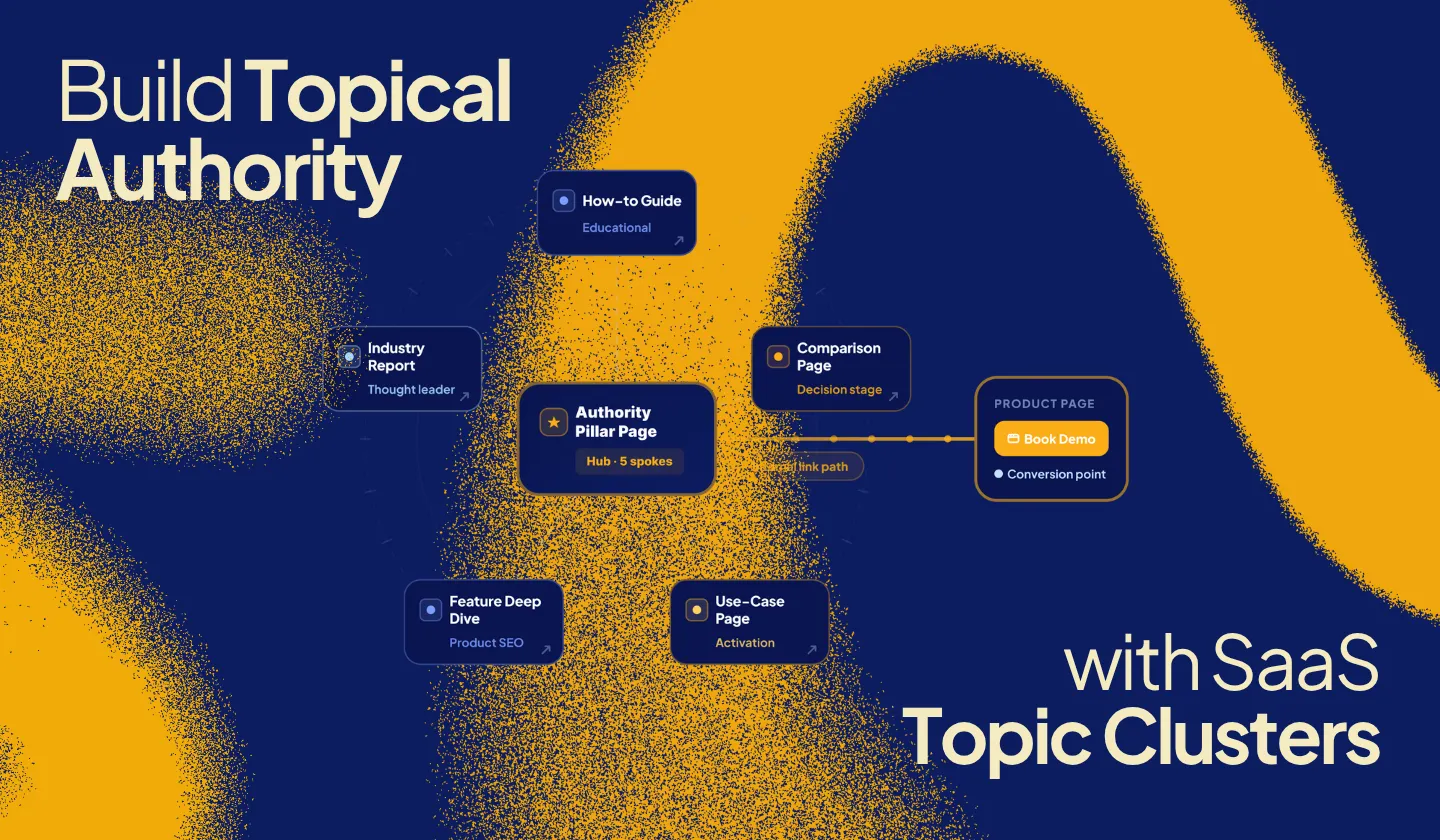
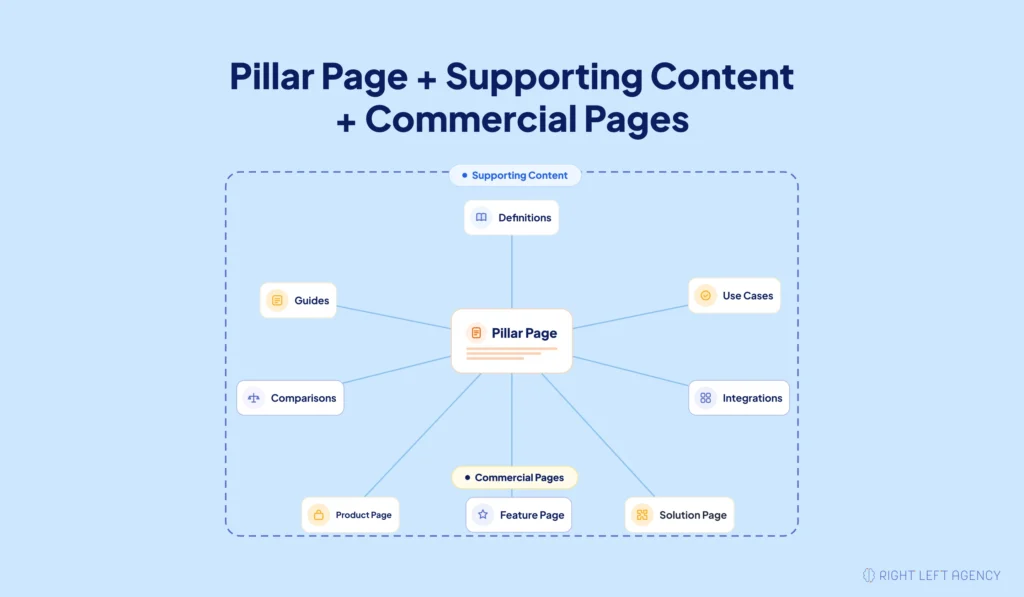
A SaaS topic cluster is a connected group of pages covering one clearly defined, product-relevant subject, typically including a central pillar page, supporting content, and contextual internal links.
It combines a broad pillar page with supporting pages addressing distinct questions, problems, use cases, and commercial search intents. For SaaS companies, the subject should connect directly to the product.
A customer onboarding platform, for example, could build a cluster focused on automated onboarding. Supporting pages might cover onboarding workflows, automation strategies, implementation challenges, templates, integrations, software comparisons, and relevant features.
These pages belong together because they help the same audience understand and solve the same broader problem.
The Core Components of a SaaS Topic Cluster
A useful SaaS topic cluster needs five elements:
- A focused main topic.
- One central pillar page.
- Supporting pages covering distinct search intents.
- Contextual links connecting related content.
- Clear pathways toward relevant commercial pages.
The cluster should function as a connected customer journey, not simply a blog category.
The Pillar Page
The pillar page acts as the cluster’s central resource.
It introduces the main subject, explains its essential components, and helps visitors find deeper supporting content. It may also connect qualified readers with relevant feature, product, integration, or use-case pages.
A pillar page about automated customer onboarding might explain:
- What customer onboarding involves
- Why onboarding performance matters
- Common onboarding challenges
- Where automation creates value
- Which workflows can be automated
- Which supporting resources provide deeper guidance
The pillar should be useful on its own without repeating every supporting article.
Supporting Cluster Pages
Supporting pages provide depth around narrower search intents.
They may include:
- Definitions
- Step-by-step guides
- Pain-point articles
- Templates
- Use cases
- Implementation advice
- Integration guides
- Comparisons
- Alternative pages
- Feature-focused content
Each page should answer one distinct need.
For example, the customer onboarding process and customer onboarding software belong to the same broader topic. However, one requires educational guidance while the other reflects commercial evaluation. They will usually need separate pages.
Topic Clusters vs. Keyword Clusters vs. Traditional Keyword Planning
A topic cluster and a keyword cluster support different planning decisions.
| Concept | Main purpose | Typical output |
|---|---|---|
| Keyword cluster | Groups queries with shared intent and similar search results | One target page |
| Topic cluster | Organizes several related pages around one broader subject | Pillar and supporting pages |
| Traditional keyword planning | Reviews keywords individually | Separate keyword-led articles |
Keyword clustering determines which search terms belong on the same page. Topic clustering determines how several pages should work together.
One SaaS topic cluster may contain several keyword clusters. Each keyword cluster can target one distinct page within the wider content system.
This distinction prevents a common problem: creating a separate article for every keyword variation.
Why Topic Clusters Help SaaS Companies Build Topical Authority
For SaaS companies, these clusters build depth around subjects that matter to customers and products, while creating clearer relationships between educational content, commercial information, and user actions.
Topical authority is not a public Google score. It describes the relevance and depth a website develops around a clearly defined subject.
A cluster supports that depth by answering connected questions across several focused pages.
Build Focused Coverage Around One Commercial Theme
A potential customer rarely makes a software decision after reading one article. Someone researching automated customer onboarding may need to understand:
- Why users abandon onboarding
- Which tasks can be automated
- How to design an onboarding workflow
- Which metrics matter
- Which tools support automation
- How competing platforms differ
One page cannot answer every question effectively without becoming unfocused. A topic cluster allows each page to satisfy a specific need while contributing to the same broader subject.
Eight tightly connected pages can create more strategic value than forty unrelated blog posts.
Connect Search Visibility to the SaaS Buyer Journey
A well-planned cluster supports different stages of the buying process.
| Buyer stage | Customer need | Suitable content |
|---|---|---|
| Awareness | Understand the problem | Definitions, challenges, causes |
| Consideration | Explore possible solutions | Guides, frameworks, use cases |
| Decision | Compare products or vendors | Comparisons, alternatives, feature pages |
Step 5 below applies this exact mapping to a full onboarding cluster, walking through the same pages from an awareness-stage question through to a decision-stage product page.
This creates a stronger relationship between organic visibility and product discovery.
Improve Navigation and Content Discovery
A connected structure helps visitors find related resources without returning to search results. The pillar provides broad direction, while supporting pages answer narrower questions, and search engines can identify the main topic and how related pages fit together.
The value comes from clear page relationships, not from inserting links everywhere.
How to Choose the Right SaaS Topic for a Cluster
The strongest SaaS cluster topics sit at the intersection of customer demand, product relevance, commercial value, search opportunity, and available expertise.
Search volume alone cannot identify the right subject.
A broad topic may attract more visitors but offer little product relevance. A narrower topic may attract fewer people while producing stronger commercial interest.
Start With a Feature, Pain Point, or Use Case
Begin with something your product genuinely helps customers achieve.
Strong starting points include:
- A core product feature
- A recurring customer problem
- A high-value use case
- An implementation challenge
- An important integration
- A role-specific workflow
- A comparison category
A customer onboarding platform should not begin with a subject as broad as customer experience.
It could focus on:
- Automated customer onboarding
- SaaS user onboarding
- Customer onboarding workflows
- Onboarding automation software
These themes are broad enough to support several pages but focused enough to remain commercially relevant.
Define the Topic Around the ICP (Ideal Customer Profile)
Your ideal customer profile should shape the cluster.
Identify:
- Who experiences the problem
- What they want to accomplish
- What triggers their search
- Which obstacles slow them down
- Which alternatives they consider
- What they need before choosing software
Suppose the product serves customer success teams at B2B SaaS companies. The cluster should reflect their priorities, including onboarding completion, time to value, customer handoffs, adoption milestones, and workflow automation.
A broad audience may generate more impressions. The right audience generates better opportunities.
Validate the Opportunity
Evaluate each possible topic using:
- Product relevance
- Audience relevance
- Search intent
- Conversion potential
- Search demand
- Existing rankings
- Competitor coverage
- SERP (search engine results page) quality
- Ranking feasibility
- Internal-linking value
- Available expertise
Keyword difficulty and domain authority can guide the decision, but they should not determine it alone.
A difficult subject may still deserve investment when the product strongly supports it, current ranking pages contain gaps, and your company can offer better expertise.
How to Build a SaaS Topic Cluster Step by Step
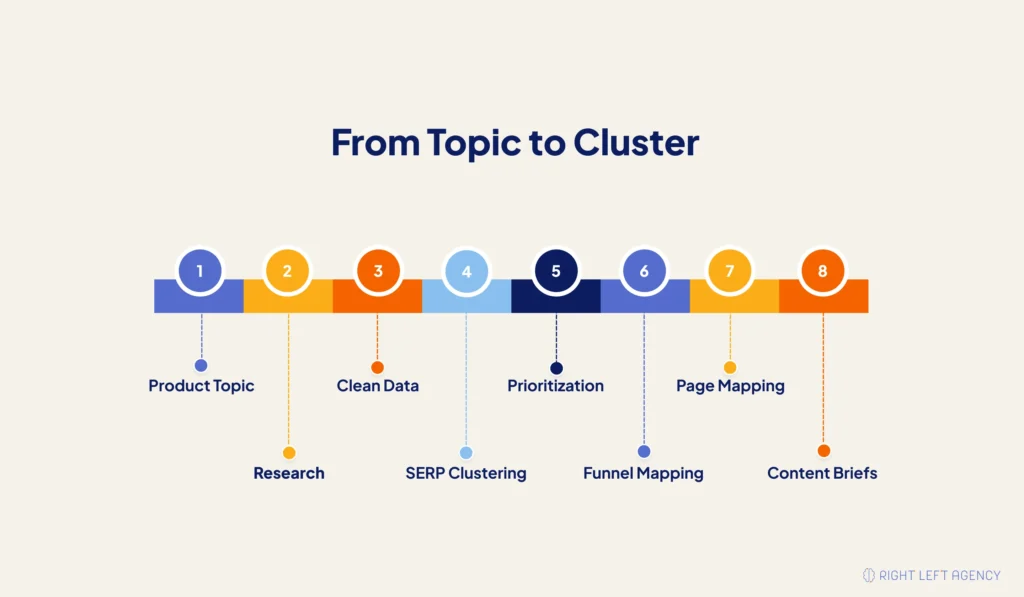
Building a SaaS topic cluster requires more than collecting related keywords. You must understand customer questions, search intent, content formats, product relationships, and page architecture.
Follow these eight steps:
- Build the initial keyword and topic dataset.
- Expand and clean the dataset.
- Cluster queries by intent and SERP similarity.
- Prioritize the strongest opportunities.
- Map the cluster across the SaaS funnel.
- Analyze combined SERPs and competitor coverage.
- Assign each cluster to the correct page type.
- Create writer-ready briefs and internal-link requirements.
Step 1: Build the Initial Keyword and Topic Dataset
Start with a focused collection of relevant seed topics.
Useful sources include:
- Product and feature pages
- Existing content
- Customer interviews
- Sales conversations
- Support tickets
- Jobs to be done
- Google Search Console
- People Also Ask
- Related searches
- Competitor content
- Software review platforms
- Relevant communities
The initial dataset does not need to be large. A smaller group of customer-relevant terms usually produces a cleaner cluster than a large export filled with loosely connected keywords.
AI tools can accelerate idea generation, but a strategist should review every suggestion for product fit, intent, and commercial value.
For Established SaaS Websites
Established websites can use first-party search data. Review Search Console for:
- Queries receiving impressions
- Pages ranking for unexpected terms
- Subjects with partial visibility
- Several pages competing for one intent
- Valuable queries with weak click-through rates
- Commercial searches reaching informational pages
These patterns can reveal where an existing page needs improvement or where a dedicated page is required.
For New SaaS Websites
New websites will have limited historical search data.
Start with:
- Product capabilities
- Customer problems
- Benefits
- Use cases
- Integrations
- Sales language
- Competitor coverage
- People Also Ask questions
- Related searches
Product demos, onboarding calls, and customer-support conversations often reveal useful topics that keyword tools miss.
Step 2: Expand and Clean the Dataset
Raw keyword lists usually contain duplicates, irrelevant searches, and misleading variations.
Remove:
- Exact duplicates
- Minor wording variations
- Unrelated searches
- Irrelevant brand queries
- Topics serving another audience
- Queries without product alignment
- Navigational searches without strategic value
Do not judge relevance by wording alone.
Employee onboarding automation may resemble customer onboarding automation, but the two searches serve different audiences and products.
The final dataset should reflect the real scope of the cluster.
Step 3: Cluster Queries by Search Intent and SERP Similarity
SERP similarity measures how often two queries return overlapping ranking pages. It helps determine whether multiple keywords should target the same page.
Consider:
- Customer onboarding checklist
- Customer onboarding process checklist
- SaaS onboarding checklist
If similar pages rank across these searches, one strong checklist page may satisfy them.
Now compare:
- Customer onboarding process
- Customer onboarding software
The wording overlaps, but the intent differs. One needs an educational guide. The other needs commercial evaluation.
Same Page or Separate Pages?
| Use one page when | Create separate pages when |
|---|---|
| Search intent is substantially similar | Search intentions differ |
| Ranking pages overlap strongly | Ranking pages differ |
| Searchers expect the same format | Searchers expect different formats |
| One page can remain focused | Combining topics weakens clarity |
| Questions support one central answer | Each query needs deeper treatment |
Linguistic similarity helps with discovery. SERP and intent analysis should guide the final page decision.
Step 4: Prioritize the Strongest Opportunities
Do not create every page suggested by your research. Score each opportunity according to its business and search value.
| Prioritization factor | Suggested weight |
|---|---|
| Product and business relevance | 30% |
| Search intent and conversion potential | 25% |
| SERP weakness or content gap | 20% |
| Realistic ranking potential | 15% |
| Search demand | 10% |
These weights provide a starting framework rather than a universal formula.
An early-stage SaaS company may place more emphasis on product relevance and realistic ranking potential. An established brand may prioritize commercial value and competitive gaps.
The model prevents search volume from dominating the strategy.
Step 5: Map the Cluster Across the SaaS Funnel
A complete cluster should include educational and commercial content.
Map every page to:
- Buyer stage
- Search intent
- Content format
- Product connection
- Next logical page
- Conversion objective
A customer onboarding cluster could include the following funnel stages (TOFU = top of funnel, MOFU = middle of funnel, BOFU = bottom of funnel):
| Funnel stage | Topic | Page type |
|---|---|---|
| TOFU | What is customer onboarding? | Foundational guide |
| TOFU | Why users abandon onboarding | Pain-point article |
| MOFU | How to automate customer onboarding | How-to guide |
| MOFU | Customer onboarding workflow examples | Use-case guide |
| BOFU | Best customer onboarding software | Commercial list |
| BOFU | Product A vs. Product B | Comparison page |
| BOFU | Automated onboarding workflows | Feature page |
Commercial pages should not remain an afterthought. They give informational visitors a logical next step.
Step 6: Analyze Combined SERPs and Competitor Coverage
Analyze search results across the whole cluster rather than reviewing each keyword in isolation.
Look for:
- Common page formats
- Repeated headings
- Recurring questions
- Important entities
- Expected content depth
- Competitors ranking across several searches
- Missing explanations
- Weak examples
- Outdated advice
- Forums appearing for unresolved questions
A forum ranking prominently may indicate that existing articles do not answer the practical problem clearly enough.
Use competitor content to understand expectations, not to copy its structure.
Step 7: Assign Each Cluster to the Correct Page Type
Not every keyword belongs in a blog article. Choose the format that best matches the intent:
- Pillar page
- Supporting article
- Product page
- Feature page
- Use-case page
- Integration page
- Comparison page
- Alternative page
- Existing-page update
- New dedicated resource
Customer onboarding automation benefits may belong in an educational article. Customer onboarding automation platform may require a product or solution page.
Correct page mapping gives each intent a suitable destination and prevents overlap.
Step 8: Create Writer-Ready Briefs and Internal-Link Requirements
Writers need more than a primary keyword and word count. Each brief should include:
- Primary topic
- Supporting queries
- Search intent
- Target audience
- Buyer stage
- Recommended format
- Questions to answer
- Important entities
- Heading guidance
- Competitor observations
- Pillar-page relationship
- Internal-link targets
- Product connection
- Conversion objective
- Existing and planned cluster pages
This context helps each page serve a distinct purpose while supporting the wider cluster.
Example SaaS Topic-Cluster Map
The same onboarding cluster from Step 5 looks like this when organized by page role instead of funnel stage:
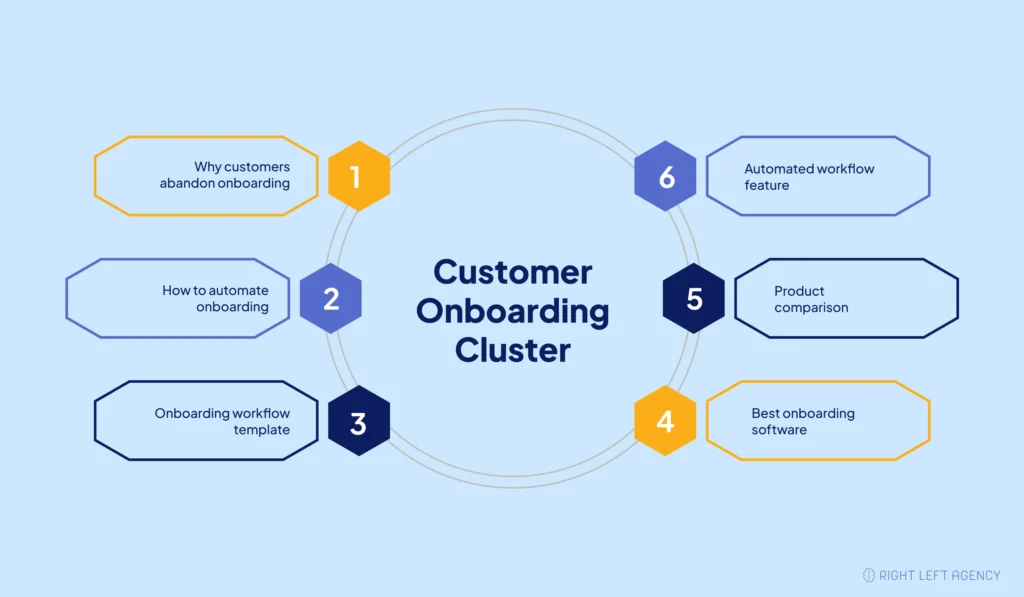
| Page role | Example page |
|---|---|
| Pillar page | Complete Guide to Automated Customer Onboarding |
| Problem page | Why Customers Abandon SaaS Onboarding |
| How-to page | How to Automate Customer Onboarding |
| Template page | Customer Onboarding Workflow Template |
| Use-case page | Automated Onboarding for Customer Success Teams |
| Commercial page | Best Customer Onboarding Software |
| Comparison page | Product A vs. Product B |
| Feature page | Automated Customer Onboarding Workflows |
Every page serves a different intent but supports the same broader subject.
How to Structure the Pillar Page and Supporting Content
The pillar should explain the broad subject and organize the cluster. Supporting pages should answer narrower questions in greater depth.
The challenge is deciding what remains on the pillar and what deserves a separate page.
Keep Broad Orientation on the Pillar
The pillar should cover:
- The topic definition
- Major components
- Essential processes
- Common challenges
- Important use cases
- Links to deeper resources
A subtopic should remain on the pillar when a concise explanation satisfies the reader.
It should receive a dedicated page when:
- The search intent is distinct.
- The topic requires substantial depth.
- Searchers expect a different format.
- The page has independent commercial value.
- Combining it would make the pillar unfocused.
This separation keeps the pillar useful without turning it into an oversized article.
Use the Pillar as a Navigation Layer
The pillar should help visitors choose their next step.
That may involve:
- A table of contents
- Short summaries of supporting topics
- Descriptive links to deeper pages
- Clear pathways toward relevant commercial content
- Updated navigation when new pages launch
When a new supporting page is published, update the pillar to include it where the relationship is useful.
Choose the Right Architecture
| Model | Best for | Advantage | Limitation |
|---|---|---|---|
| Simple blog model | Early-stage websites | Fast to implement | Less visible hierarchy |
| Dedicated topic hub | Strategically important subjects | Clear navigation | Requires maintenance |
| Resource library | Larger websites with several clusters | Scalable organization | Can become complex |
A smaller SaaS website can begin with one pillar and a few supporting articles.
A larger website may need dedicated hubs for onboarding, activation, retention, integrations, and reporting.
Launch a Focused Cluster First
A practical first launch can include:
- One pillar page
- Two educational pages
- One practical guide
- One commercial or use-case page
The cluster can later grow toward eight to ten focused pages as search data and customer questions reveal new opportunities.
Publish the strongest pages, connect them properly, and expand using evidence.
How to Build the Internal-Linking Structure
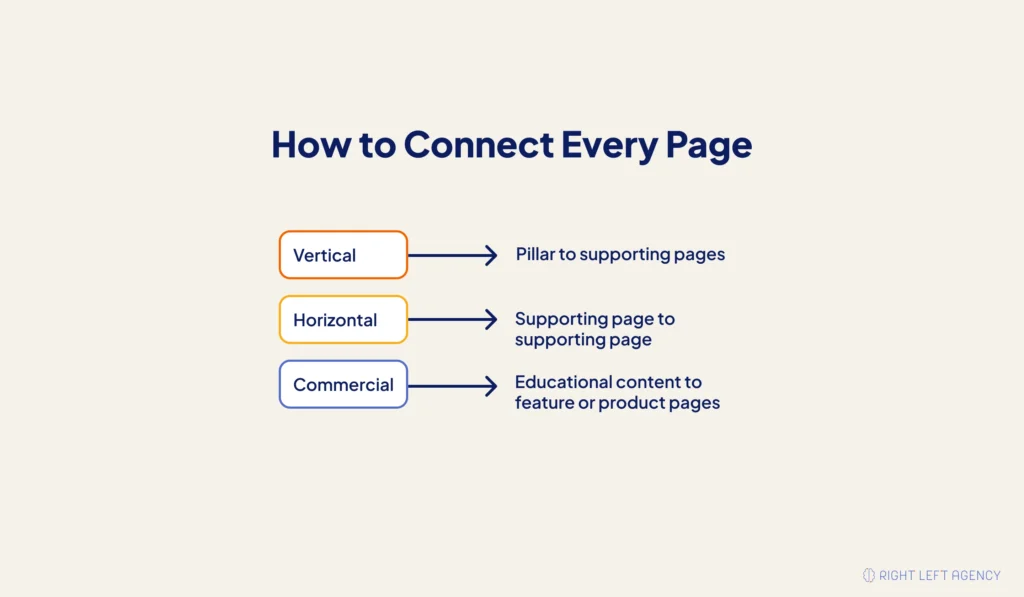
Internal linking should be planned during page mapping and content briefing.
A complete structure includes vertical links, horizontal links, and relevant commercial links.
Build Vertical Links
The pillar should link to every strategically important supporting page.
Supporting pages should link back to the pillar when readers need broader context.
Use descriptive anchor text such as:
- Customer onboarding workflow
- Automated onboarding checklist
- Customer onboarding software comparison
Avoid vague phrases such as “click here.”
Build Horizontal Links
Related supporting pages should connect where the relationship benefits the reader.
For example:
- A pain-point article can link to a practical solution.
- A checklist can link to an implementation guide.
- A comparison can link to an alternative page.
- A workflow guide can link to an integration resource.
These links should help readers continue solving the same problem.
Connect Educational and Commercial Pages
Educational content should link to commercial pages when the product directly supports the issue being discussed.
A guide about reducing onboarding delays could link to:
- A workflow automation feature
- A customer onboarding solution page
- A relevant integration
- A product comparison
The connection should feel useful rather than promotional.
Maintain Link Health
A common implementation problem occurs when teams publish new content without updating older pages that should link to it.
Regularly check for:
- Orphan pages
- Broken links
- Redirected destinations
- Missing pillar links
- Outdated anchors
- New pages without inbound links
- Commercial pages isolated from educational content
Update the structure whenever pages are published, merged, removed, or redirected.
How to Measure, Test, and Expand a SaaS Topic Cluster
Measure the cluster as one connected content system.
Individual rankings matter, but they do not show whether the cluster improves product discovery, qualified traffic, or pipeline.
Leading SEO Indicators
Track:
- Total cluster impressions
- Organic clicks
- Ranking queries
- Indexed pages
- Non-branded visibility
- New Search Console queries
- Internal-link engagement
- Pages ranking for unintended terms
These indicators show whether search visibility and content discovery are improving.
Business Outcome Indicators
Track:
- Product signups
- Trial starts
- Activation events
- Demo requests
- Product-qualified leads
- Commercial-page visits
- Assisted pipeline
- Revenue influenced
- Conversion rates by page and cluster
Visibility often improves before commercial results appear. Measure both groups without treating assisted revenue as direct causation.
Expand Using Real Evidence
Expand the cluster when data reveals a distinct opportunity.
Useful signals include:
- New Search Console queries
- Repeated customer questions
- New product capabilities
- Ranking declines
- Emerging People Also Ask questions
- New integrations
- Competitor additions
- Pages ranking for the wrong intent
Do not create another page because a tool produced another keyword variation.
Create it because the intent, product relationship, and business value justify the investment.
Refresh and Govern Existing Content
Review the cluster regularly.
You may need to:
- Update outdated examples
- Improve weak pages
- Merge duplicate content
- Separate conflicting intentions
- Refresh product information
- Repair internal links
- Consolidate cannibalizing pages
- Update the cluster map
Every page should continue serving a unique purpose.
Common SaaS Topic-Cluster Mistakes
Most topic clusters fail because of poor scope, incorrect page mapping, weak commercial connections, or missing maintenance.
| Mistake | Why it happens | Impact | Better approach |
|---|---|---|---|
| Choosing an overly broad topic | Teams chase maximum traffic | The cluster becomes unfocused | Start with one product-relevant problem |
| Creating one page per keyword | Keywords are planned independently | Pages compete for the same intent | Group terms using SERP overlap |
| Grouping by wording alone | Similar phrases appear related | Different intentions get combined | Validate search results and formats |
| Publishing only TOFU content | Educational topics seem easier | Traffic has no conversion path | Add use cases and commercial pages |
| Delaying comparisons | Teams avoid direct evaluation content | Competitors capture decision-stage demand | Publish high-intent pages early |
| Adding links after publication | Linking is treated as maintenance | Pages remain poorly connected | Define links inside each brief |
| Trusting automation completely | Tools accelerate research | Irrelevant or duplicate pages appear | Apply human strategic review |
| Treating the cluster as finished | Publishing becomes the final goal | Rankings and relationships deteriorate | Refresh using search and product data |
Build Topical Authority Around Business Value
SaaS topical authority comes from focused, connected, and commercially relevant coverage—not content volume.
Choose one subject your product genuinely supports. Map its search intents, assign each page a distinct role, and connect the cluster to clear product pathways.
If your SaaS blog contains disconnected articles without a clear structure, Right Left Agency can help turn them into a focused topic-cluster strategy supporting visibility, product discovery, and qualified pipeline.
Frequently Asked Questions About SaaS Topic Clusters
What are SaaS topic clusters?
SaaS topic clusters are connected groups of pages covering one product-relevant subject. They usually combine a broad pillar page, supporting pages addressing distinct search intents, contextual internal links, and pathways toward relevant commercial pages.
How do you create a SaaS topic cluster?
Collect relevant topics, remove unrelated queries, group searches by intent and SERP similarity, prioritize valuable opportunities, assign the correct page types, create detailed briefs, and plan internal links before publishing.
How many pages should a SaaS topic cluster contain?
There is no fixed number. A practical cluster may begin with one pillar and four supporting pages. It can expand toward eight to ten focused pages when performance data reveals valuable opportunities.
Should a new SaaS website avoid difficult keywords?
Not automatically. Keyword difficulty should be considered alongside product relevance, search intent, SERP weakness, conversion potential, competitor quality, and available expertise.
How often should a topic cluster be updated?
Review the cluster when rankings change, new queries appear, customer questions evolve, product features change, links break, or pages begin competing for the same intent.