Key Takeaways
- Product-driven SEO transforms organic traffic to signups, activations, pipelines, and revenue.
- SaaS companies need to create landing pages based on templates, integrations, comparisons, tools, and workflow.
- High-intent keywords can lead to more product action than generic traffic.
- All CTA must cater to the intent of the visitor and take their process further.
- Measurable success includes signups, activations, PQLs, pipelines, and revenue.
What Is Product-Led SEO for SaaS?
Product-led SEO for SaaS is an organic growth strategy where the product shapes the content strategy, keyword targeting, page format, and conversion path. It connects what people search for with what your product helps them do.
Product-Led SEO Definition
Product-led SEO starts with product value.
Traditional SEO often starts with keywords. A team finds search volume, writes blog posts, adds internal links, and tracks rankings. That can build visibility, but it does not always create product demand.
Product-led SEO starts with a sharper question:
What does our product help users accomplish, and how do those users search for that outcome?
That question changes the strategy. The product stops being something you mention at the end of the article. It becomes part of the page experience.
A product-led SEO page should help the visitor do at least one of these things:
- Understand a problem more clearly
- See a practical workflow
- Compare possible solutions
- Try a template, tool, or demo
- Move naturally toward signup or demo
- Reach the first meaningful product action faster
In other words, the page should not only answer a query. It should create a bridge between search intent and product value.
Product-Led SEO in One Sentence
Product-led SEO connects what users search for with what your SaaS product helps them do.
A regular blog post might explain how to plan a campaign. A product-led page might give the visitor a campaign planning template, show how the workflow works, and invite them to use that template inside the product.
That difference matters. One page informs. The other helps the user act.
Product-Led SEO Examples
The easiest way to understand product-led SEO is to look at page types.
Zapier is a strong example of integration-led SEO. People search for ways to connect apps and automate tasks. Zapier meets the demand with integration pages that explain the workflow and move users toward creating an automation.
Airtable shows the power of template-led SEO. Someone searching for a content calendar template, CRM template, or project tracker already wants a useful asset. A template page gives them value quickly and creates a natural reason to sign up.
Calendly inspires use-case-led SEO. Pages about sales calls, recruiting interviews, onboarding meetings, or customer success check-ins can connect scheduling pain points with product usage.
Loom inspires workflow-led SEO. People searching for ways to reduce meetings, explain tasks, or share product updates may be ready to try async video once they see the workflow clearly.
The lesson is not to copy these brands. The lesson is to look inside your product and find the pages your future users already want.
Why Traditional SaaS SEO Often Stops at Traffic
Traditional SaaS SEO often focuses on rankings, traffic, and content output. Those metrics matter, but they do not prove business impact. A page can rank well and still fail if it attracts the wrong audience, lacks product context, or sends every visitor to a generic CTA.
The Problem With Traffic-Only SEO
Traffic can hide weak strategy.
A SaaS company can rank for broad informational keywords and still generate very few signups. This often happens when the content answers basic questions but never connects the reader to a real product use case.
For example, a project management SaaS might rank for “what is project management.” That keyword can bring visitors, but many of them may only need a definition.
A product-led SEO strategy would also target searches like:
- Project timeline template
- Client approval workflow
- Agency project management software
- Asana vs. Trello for agencies
- Project management tool with Slack integration
These keywords may not always have the highest search volume. But they usually sit closer to a task, workflow, comparison, or buying decision.
That is where SaaS SEO becomes more useful.
Why SaaS SEO Needs Conversion Context
SaaS companies do not grow because people visit the website. They grow when the right people take meaningful actions.
Those actions can include:
- Product signups
- Free trial starts
- Freemium accounts
- Demo requests
- Template uses
- Integration connections
- Activation
- Product-qualified leads
- Sales-qualified leads
- Pipeline
- Revenue
- Retention
- Expansion
Not every SEO page needs to sell aggressively. Some pages should educate. Some should compare options. Some should introduce a workflow. Some should push directly toward signup or demo.
But every page should have a clear job.
If a page attracts awareness traffic, it should guide readers toward related product-led pages. If a page targets buyer intent, it should make the next step obvious. If a page promises a template, the signup flow should continue with that template.
That is conversion context.
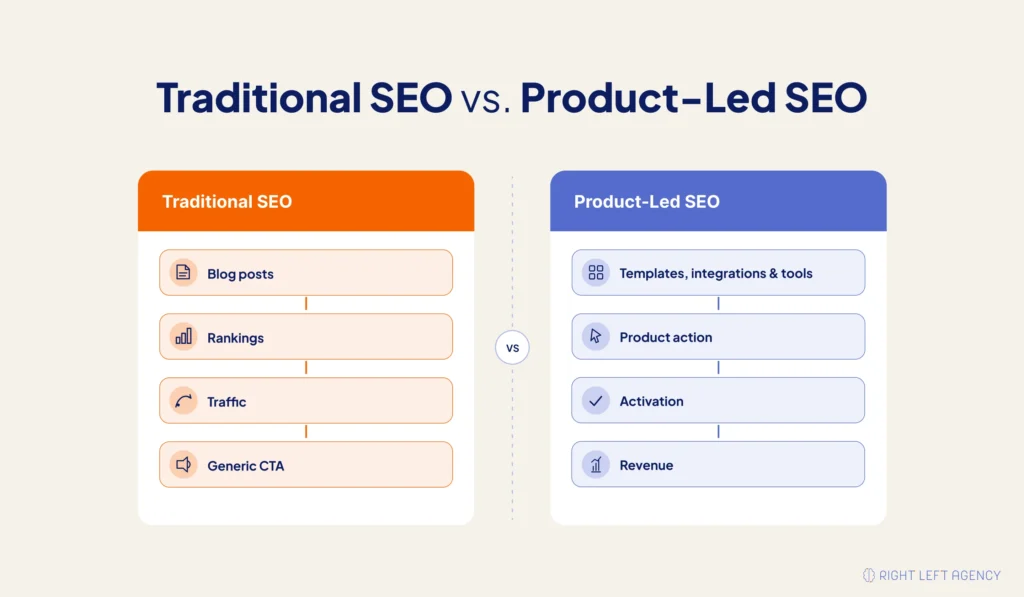
Traditional SEO vs. Product-Led SEO
| Area | Traditional SaaS SEO | Product-Led SEO |
|---|---|---|
| Starting point | Keywords and search volume | Product use cases and user intent |
| Main goal | Rankings and traffic | Signups, activation, PQLs, and revenue |
| Common format | Blog posts and guides | Templates, tools, integrations, comparisons, workflows |
| CTA style | Same CTA across many pages | CTA matched to the page intent |
| Measurement | Sessions, rankings, impressions | Signups, activation, pipeline, revenue |
| User experience | Read and leave | Learn, try, compare, and act |
| Growth role | Mostly awareness | Acquisition and activation |
Traditional SEO helps people find you. Product-led SEO helps the right people understand why they should use you.
Why Product-Led SEO Works So Well for SaaS
Product-led SEO works well for SaaS because software products solve repeatable problems. Those problems often show up in search as templates, integrations, workflows, dashboards, calculators, alternatives, and comparisons.
SaaS Products Already Contain Searchable Assets
Most SaaS teams do not need to invent SEO ideas from scratch. Many ideas already exist inside the product.
Look at what your product includes:
- Templates
- Features
- Integrations
- Dashboards
- Reports
- Calculators
- Automation steps
- Use-case workflows
- Product tutorials
- Collaboration flows
- Comparison points
- Industry-specific setups
Each of these can become a search asset if people are already looking for it.
A CRM can create sales pipeline templates, follow-up workflows, lead scoring pages, and competitor comparison pages.
A customer success platform can create renewal tracking workflows, churn risk calculators, onboarding checklists, and customer health score dashboards.
A marketing platform can create campaign templates, reporting dashboards, content calendars, and automation workflows.
The best product-led SEO ideas usually come from product usage, sales calls, support tickets, customer language, and onboarding patterns.
It Matches Search Intent More Closely
A visitor searching for “content calendar template” is not asking for a 2,000-word lecture on content planning. They want something practical.
A visitor searching for “HubSpot alternatives for startups” probably does not want a generic CRM definition. They want to understand options, trade-offs, pricing, use cases, and fit.
Product-led SEO works because it gets closer to the job behind the keyword. It does not force every searcher into the same blog journey.
That closeness improves conversion because the page feels useful immediately.
It Works for PLG, Sales-Led, and Hybrid SaaS
Product-led SEO does not only work for freemium products.
For product-led growth companies, SEO can drive users into templates, tools, free trials, dashboards, or workflows.
For sales-led SaaS companies, SEO can support demo requests through comparison pages, use-case pages, ROI calculators, and product walkthroughs.
For hybrid SaaS companies, SEO can bring users into the product first and help sales prioritize accounts later based on product behavior.
For example, an organic visitor who signs up from an integration page, connects an app, invites teammates, and returns the next day is showing real product intent. That behavior tells the sales team much more than a simple ebook download.
It Helps Users Reach Value Faster
The faster a user reaches value, the better the chance they keep going.
Product-led SEO can shorten that path. If someone clicks “Use this template,” they should not land on a blank dashboard. They should land inside the template or as close to it as possible.
If someone clicks “Connect this integration,” they should see the integration setup flow. If someone clicks “Try this workflow,” onboarding should start with that workflow.
The page sets the promise. The product should continue it.
The Product-Led SEO Funnel for SaaS
A product-led SEO funnel connects search intent to product action. It moves the user from a query to a relevant page, from the page to signup or demo, and from signup to activation, PQL, pipeline, or revenue.
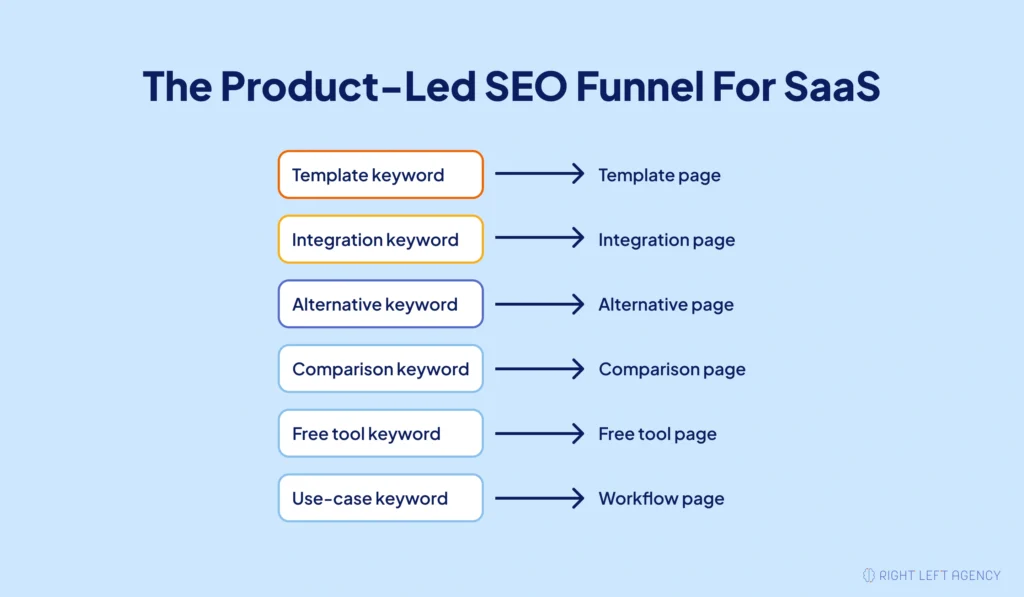
Stage 1 — Search Intent
Everything starts with why the user searched.
SaaS buyers and users search in many ways. Some want to solve a problem. Some want a template. Some want to compare tools. Some want to connect apps. Some want a free calculator. Some want to see a product demo before speaking to sales.
Common search intent types include:
- Problem-aware searches
- Use-case searches
- Template searches
- Integration searches
- Alternative searches
- Comparison searches
- Free tool searches
- Demo searches
Each intent needs a different page experience.
Stage 2 — Product-Led Page Type
The page format should match the searcher’s task.
| Search Intent | Best Product-Led SEO Asset |
|---|---|
| “How to create a project plan” | Template page |
| “Slack alternative” | Alternative page |
| “HubSpot vs. Salesforce” | Comparison page |
| “Connect Google Sheets to Slack” | Integration page |
| “Free churn calculator” | Free tool page |
| “How to automate onboarding” | Use-case workflow page |
| “Product onboarding demo” | Demo-led SEO page |
A template query should not become a generic blog post. An integration query should not become a broad opinion piece. A comparison query should not send visitors to a basic feature page.
When the format matches the intent, the page feels more helpful, and the CTA feels less forced.
Stage 3 — Product Value Demonstration
Before asking for a signup, show why the product matters.
A strong product-led page usually includes:
- The problem
- The workflow
- The product action
- The outcome
- A screenshot, demo, GIF, or template preview
- Relevant use cases
- A clear next step
The visitor should not have to guess how the product helps. The page should make the value obvious.
Stage 4 — Signup, Trial, or Demo CTA
The CTA should feel like a continuation of the task.
| Page Type | Best CTA |
|---|---|
| Template page | Use this template |
| Free tool page | Save your results |
| Integration page | Connect this integration |
| Use-case page | Try this workflow |
| Comparison page | Start free trial or book demo |
| Alternative page | Switch to [Product] |
| Demo-led page | Watch walkthrough or book demo |
“Book a demo” is useful in the right place, but it should not be the only CTA across every page.
A template visitor wants the template. An integration visitor wants the connection. A comparison visitor wants clarity and confidence.
The CTA should respect that.
Stage 5 — Activation and PQL Tracking
Signup is not the finish line.
A SaaS team should track what happens next. Did the user use the template? Did they connect the integration? Did they invite a teammate? Did they finish onboarding? Did they return and keep using the product?
That is where product-led SEO becomes measurable.
A form fill tells you someone was interested. Product behavior tells you whether they experienced value.
How to Build a Product-Led SEO Strategy for SaaS
To build a product-led SEO strategy, SaaS teams need to map search demand to product value. The process starts with product-search overlap, then moves into keyword grouping, page prioritization, asset creation, CTA alignment, and measurement.
Step 1 — Find Product-Search Overlap
Product-search overlap is the connection between what people search for and what your product helps them do.
This is the foundation of the strategy. Without product-search overlap, a page may rank but struggle to convert.
Start by reviewing:
- Product features
- Customer use cases
- Sales call notes
- Support tickets
- Onboarding questions
- Product analytics
- Customer interviews
- Competitor comparisons
- Common integration requests
Then ask:
- What problems do users bring to us?
- What workflows do we improve?
- What templates would help users start faster?
- What integrations do users care about?
- What competitors do buyers compare us with?
- What product actions lead to activation?
- What phrases do customers use before they buy?
Examples:
| SaaS Product | Product-Search Overlap |
|---|---|
| CRM | Sales pipeline template |
| Project management tool | Sprint planning template |
| HR software | Employee onboarding checklist |
| Analytics platform | KPI dashboard template |
| Customer success platform | Renewal tracking workflow |
| Marketing automation tool | Lead nurturing workflow |
This process keeps SEO close to real product value.
Step 2 — Group Keywords by Product Intent
Product-led SEO keyword research should group keywords by what the user wants to do.
Search volume still matters, but it should not be the only filter. A smaller keyword with clear product intent can be more valuable than a broad keyword with weak buying or usage intent.
| Keyword Group | Example | Intent |
|---|---|---|
| Template keywords | Content calendar template | Action intent |
| Integration keywords | Connect Slack and Google Sheets | Workflow intent |
| Alternative keywords | Notion alternative | Switcher intent |
| Comparison keywords | Asana vs. Trello | Evaluation intent |
| Use-case keywords | Manage client onboarding | Problem-solving intent |
| Free tool keywords | Churn rate calculator | Utility intent |
| Demo keywords | Product onboarding demo | Evaluation intent |
This approach helps the team avoid chasing traffic that never converts.
Step 3 — Prioritize Pages by Business Value
Not every SEO page should have the same priority.
If the goal is SaaS signups, activation, and pipeline, prioritize pages that sit closer to product action.
| Priority | Page Type | Why It Matters |
|---|---|---|
| High | Template pages | Strong action intent and fast signup path |
| High | Comparison pages | Strong buying and evaluation intent |
| High | Alternative pages | Strong switcher intent |
| Medium | Integration pages | Clear workflow intent |
| Medium | Use-case pages | Strong product education value |
| Medium | Free tools | Useful for value-first acquisition |
| Lower | Broad informational blogs | Helpful for awareness, weaker for direct conversion |
Informational content still has value. It can support topic clusters, internal links, and early-stage education.
But if the business needs more signups, high-intent product-led pages should not sit at the bottom of the roadmap.
Step 4 — Choose the Right Page Format
The page type should match the keyword group.
Strong product-led SEO assets include:
- Template pages
- Template galleries
- Free tools
- Integration pages
- Comparison pages
- Alternative pages
- Use-case pages
- Workflow guides
- Demo-led pages
- Programmatic landing pages
- Product tutorials
For example, “client onboarding template” should become a template page, not a general article about onboarding. “Asana vs. Trello” should become a comparison page, not a generic project management guide.
The wrong format can waste good intent.
Step 5 — Build Around the User’s Job-to-Be-Done
A product-led SEO page should focus on the task the user wants to complete.
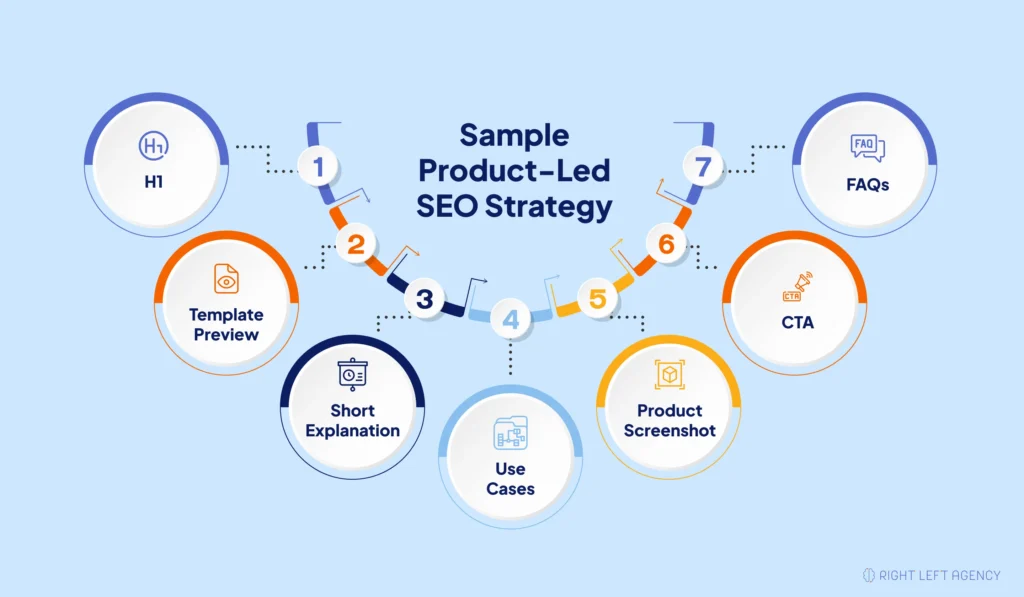
A strong page structure often includes:
- A problem-focused H1
- A short answer near the top
- A practical explanation
- A workflow or step-by-step section
- A product example, screenshot, template, or demo
- Benefits and use cases
- A CTA matched to intent
- FAQs
- Related internal links
For example, a “client onboarding template” page should show the template quickly. It should explain who it is for, what it includes, how to use it, and how the product helps the user run the process.
It should not bury the useful asset under generic advice.
Step 6 — Match CTAs to Intent
A product-led SEO page converts better when the CTA matches what the visitor came to do.
| Page Type | Primary CTA | Secondary CTA |
|---|---|---|
| Template page | Use this template | See related templates |
| Free tool page | Save your results | Create free account |
| Integration page | Connect this app | View setup guide |
| Use-case page | Try this workflow | Watch demo |
| Comparison page | Start free trial | Book a demo |
| Alternative page | Compare features | Start free trial |
| Demo page | Watch walkthrough | Talk to sales |
A good CTA does not feel like a hard turn. It feels like the next step.
Step 7 — Measure More Than Organic Sessions
Product-led SEO should be measured across the whole journey.
Track:
- Organic clicks
- Organic signups
- Trial starts
- Demo requests
- Signup conversion rate
- Activation rate
- Time to value
- PQLs
- MQL-to-SQL conversion
- Free-to-paid conversion
- Pipeline influenced
- Revenue influenced
- CAC
- LTV
Google Search Console can show visibility. GA4 can show page and conversion behavior. Product analytics can show activation. CRM data can show pipeline and revenue.
You need all of them to understand whether SEO is creating growth.
Product-Led SEO Page Types SaaS Companies Should Build
The strongest product-led SEO strategies use more than blog posts. They build searchable assets that match how users compare, evaluate, try, and adopt software.
1. Template Pages
Template pages work because they give the visitor something useful right away.
A person searching for a template usually wants to start a task faster. That makes the path from search to signup much smoother.
Examples include:
- Project plan template
- Content calendar template
- Meeting notes template
- Sales pipeline template
- Customer onboarding template
- Sprint planning template
- Campaign brief template
A strong template page should preview the asset, explain its use case, and show how the user can customize it inside the product.
Best CTA: Use this template for free
2. Free Tool Pages
Free tools help users solve a small problem before they create an account.
They can also earn links, improve brand trust, and create a natural path into the paid product.
Examples include:
- ROI calculator
- Churn calculator
- SEO audit checker
- Headline generator
- Budget planner
- Benchmark calculator
- Lead scoring calculator
The tool should be simple enough to use quickly but valuable enough to make saving results worthwhile.
Best CTA: Save your results inside [Product]
3. Integration Pages
Integration pages work because the searcher already knows what they want to connect.
A strong integration page should explain:
- What the integration does
- How to set it up
- What workflows it supports
- What data moves between tools
- What use cases become easier
- What the next step is
For example, an automation SaaS can create pages for “connect Google Sheets to Slack” or “send Typeform responses to HubSpot.” The user already has a workflow in mind, so the page should help them build it.
Best CTA: Connect this integration
4. Alternative Pages
Alternative pages capture users who are considering a switch.
These pages need honesty. Readers can tell when a page only exists to attack a competitor. A stronger page explains fit, trade-offs, limitations, pricing context, migration concerns, and use cases.
A good alternative page covers:
- Who the competitor is best for
- Who your product is best for
- Key feature differences
- Pricing considerations
- Migration notes
- Use-case fit
- Limitations
- Switching process
Best CTA: Compare features or Start free trial
5. Comparison Pages
Comparison pages help buyers make decisions.
A strong comparison page does not pretend every competitor is bad. It helps readers understand which tool fits their situation.
Include:
- Feature comparison
- Pricing comparison
- Ease-of-use notes
- Best-fit users
- Product screenshots
- Limitations
- Migration notes
- Honest recommendation
For example, an “Asana vs. Trello for agencies” page should explain which product fits client approvals, project visibility, campaign planning, task management, and reporting.
G2-style comparison intent also matters here. Buyers often want validation, shortlist guidance, and proof before they talk to sales.
Best CTA: Start free trial or Book a demo
6. Use-Case Workflow Pages
Use-case workflow pages show how a specific team solves a specific problem with the product.
These pages feel more relevant than generic blog posts because they speak to a real work situation.
Examples include:
- How marketing teams manage async campaigns
- How agencies automate client onboarding
- How finance teams create approval workflows
- How customer success teams track renewals
- How sales teams manage follow-up workflows
A strong use-case page should show the audience, the pain point, the workflow, the product action, and the outcome.
Best CTA: Try this workflow
7. Demo-Led SEO Pages
Demo-led SEO pages turn product walkthroughs into searchable assets.
Instead of hiding the product behind a sales form, SaaS teams can create pages that show one workflow clearly and invite the visitor to go deeper.
A strong demo-led page includes:
- A pain-point-focused H1
- A short introduction
- A demo video or interactive walkthrough
- Step-by-step explanation
- Screenshots or GIFs
- Transcript
- FAQs
- CTA
- Related demos
For example, a product onboarding SaaS could create a page like “product onboarding demo for PLG teams.” The page can show the workflow, answer common buyer questions, and guide users toward trial or demo.
Best CTA: Watch product walkthrough or Book demo
How to Convert Organic Traffic Into Product Signups
Turning organic traffic into signups takes more than adding a button. The page promise, product preview, CTA, signup flow, onboarding, and activation moment all need to work together.
Show Product Value Before Asking for Signup
Users need a reason to believe the product can help.
Show value through:
- Screenshots
- Template previews
- Interactive demos
- Product GIFs
- Workflow examples
- Calculators
- Dashboard previews
- Before-and-after examples
A page that only describes features can feel abstract. A page that shows the product solving the exact problem feels practical.
Use CTAs That Match the Page
The best CTA depends on why the user came to the page.
Useful CTA examples include:
- Use this template
- Try this workflow
- Connect your app
- Generate your report
- Start with this dashboard
- Create a free account
- Book a product walkthrough
- Save your results
- Build your first automation
Specific pages need specific CTAs. When the CTA matches intent, the next step feels natural.
Reduce Signup Friction
The signup flow should continue the page experience.
If a user clicks from a template page, take them to the template. If they click from an integration page, take them toward the integration setup. If they click from a free tool, let them save or expand their results.
Ways to reduce friction include:
- Use short forms
- Offer social login
- Show one clear next step
- Preload the template or workflow
- Keep onboarding relevant to the entry page
- Remove unnecessary setup steps
- Guide users toward first value quickly
Do not make users restart the journey after they sign up.
Optimize for Activation, Not Just Signup
A signup only matters if the user reaches value.
Activation can look different for each product. It may happen when a user:
- Creates the first project
- Uses the first template
- Connects the first integration
- Invites a teammate
- Builds the first dashboard
- Exports a report
- Completes onboarding
- Returns within one week
This is where product-led SEO becomes more powerful than traffic-focused SEO. You can see which pages bring users who actually engage with the product.
Product-Led SEO and AI Search
AI search makes product-led SEO even more important. Answer engines prefer content that is clear, specific, structured, and useful. SaaS pages with workflows, product examples, comparison tables, templates, and direct answers are easier for AI systems to understand and summarize.
Why Generic SaaS Content Is Easier to Replace
Generic content is easy to summarize.
If your article only explains basic definitions, AI systems can answer the user without sending much attention back to your brand.
Product-led content is harder to replace because it includes product-specific value, such as:
- Real workflows
- Product screenshots
- Use-case examples
- Templates
- Comparison tables
- Product-specific steps
- Customer language
- Practical next actions
This gives both readers and AI systems more useful context.
How to Make Product-Led SEO AI-Friendly
Structure matters.
Use:
- Direct answers after headings
- Clear definitions
- Question-based subheadings
- Structured lists
- Comparison tables
- Step-by-step workflows
- Product screenshots
- FAQ blocks
- Schema markup
- Specific SaaS examples
- Consistent product positioning
Avoid vague claims like “streamline your workflow” without explaining what the workflow is, who it helps, and what outcome it creates.
AI Search Optimization Pattern
A simple pattern works well:
Question: What is product-led SEO for SaaS?
Direct answer: Product-led SEO for SaaS is an organic growth strategy that uses product use cases, templates, tools, integrations, and workflows to attract search traffic and turn visitors into signups, trials, demos, activated users, and revenue.
Expansion: Then explain the strategy with examples, page types, CTAs, and metrics.
This format helps humans scan the page and helps AI systems extract the answer.
Common Product-Led SEO Mistakes SaaS Teams Make
Product-led SEO fails when teams treat it like ordinary content marketing. It needs product relevance, strong page architecture, clear CTAs, product analytics, and a real path from search intent to product value.
Mistake 1 — Choosing Keywords With No Product Fit
High search volume is tempting, but it can waste time if the product does not naturally solve the searcher’s problem.
A keyword should earn its place in the roadmap because it connects to product value, not only because it has volume.
Better approach: Start with product-search overlap, then validate demand.
Mistake 2 — Using the Same CTA Everywhere
Many SaaS sites send every visitor to “Book a demo.”
That works for some buyer-intent pages, but it does not work for every search.
A template visitor wants the template. An integration visitor wants the setup. A comparison visitor wants clarity. A free tool user may want to save results.
Better approach: Match the CTA to the page intent.
Mistake 3 — Building Product Pages With No Search Demand
Some teams go too far in the other direction. They create product-led pages for every feature, even when no one searches for those terms.
Product value matters. Search demand matters too.
Better approach: Build pages where product relevance and search behavior overlap.
Mistake 4 — Measuring Only Rankings and Traffic
Rankings show visibility. Traffic shows reach. Neither proves growth by itself.
A product-led SEO program should also track signups, trials, demos, activation, PQLs, pipeline, and revenue.
Better approach: Connect SEO reporting with product analytics and CRM data.
Mistake 5 — Sending Users Into a Weak Product Experience
If onboarding is confusing, templates are empty, or integrations break, product-led SEO will struggle.
The page may do its job, but the product experience will lose the user.
Better approach: Improve the first-use experience before scaling signup-focused SEO pages.
Product-Led SEO Measurement Framework
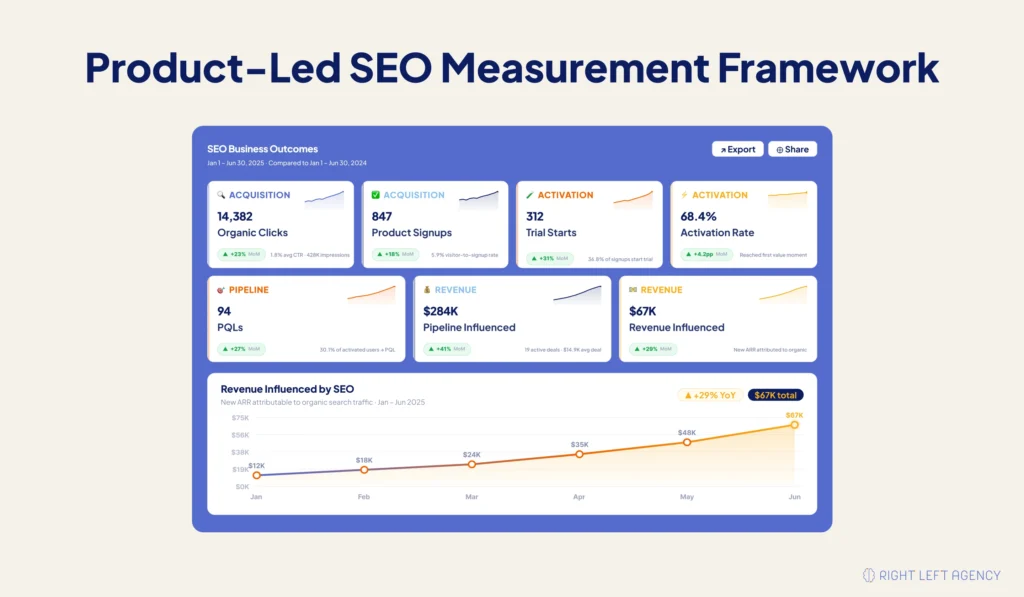
A strong measurement framework connects search performance with product and revenue outcomes. It helps teams understand which pages attract the right people and which pages create real growth.
SEO Metrics
SEO metrics show whether your pages are discoverable.
Track:
- Impressions
- Rankings
- Organic clicks
- CTR
- Indexed pages
- Backlinks
- Internal link performance
- Crawl and index health
These numbers matter, but they only show the top of the journey.
Conversion Metrics
Conversion metrics show whether visitors take the next step.
Track:
- CTA clicks
- Signup conversion rate
- Trial starts
- Demo requests
- Free tool completions
- Template uses
- Form submissions
- Product walkthrough clicks
These metrics show whether the page promise and CTA are working.
Product Metrics
Product metrics show whether SEO users reach value.
Track:
- Activation rate
- Time to value
- Feature adoption
- Integration connections
- Team invites
- Usage frequency
- PQLs
- Onboarding completion
This is where product-led SEO becomes more honest. You can see whether organic users actually use the product.
Revenue Metrics
Revenue metrics show whether SEO supports the business.
Track:
- Free-to-paid conversion
- Pipeline influenced
- Revenue influenced
- CAC
- LTV
- Expansion revenue
- Retention impact
When SEO connects to revenue, it becomes easier to defend budget, prioritize pages, and prove impact.
Recommended Reporting View
| Page Type | SEO Metric | Conversion Metric | Product Metric | Revenue Metric |
|---|---|---|---|---|
| Template page | Organic clicks | Template signups | Template used | Paid conversion |
| Integration page | Rankings | Integration CTA clicks | App connected | Expansion |
| Comparison page | Organic sessions | Demo requests | PQLs | Pipeline |
| Free tool page | Backlinks | Saved results | Account created | Revenue influenced |
| Use-case page | CTR | Trial starts | Workflow completed | Revenue influenced |
A good report should answer one question clearly: “Which SEO pages help users move from search to product value?”
Product-Led SEO Example Strategy for a SaaS Company
A practical product-led SEO strategy should start small. Choose one audience, one product category, and one high-intent page type before trying to build everything.
Let’s use a fictional product: project management software for agencies.
Target Audience
The product helps marketing agencies, creative teams, and client service teams manage projects, approvals, deadlines, reporting, and collaboration.
SEO Roadmap
Start with pages that match real agency workflows.
Template pages:
- Client onboarding template
- Project timeline template
- Content calendar template
- Client approval checklist
- Campaign planning template
Use-case pages:
- How agencies manage client approvals
- How marketing teams track campaign tasks
- How creative teams manage revision workflows
- How agencies plan monthly retainers
Comparison pages:
- Asana vs. Trello for agencies
- Best project management tools for agencies
- Monday.com alternatives for agency teams
Integration pages:
- Slack project management integration
- Google Drive project workflow integration
- Calendar integration for agency deadlines
CTA Strategy
Each page should lead to a relevant next step.
Examples:
- Use this template
- Start free workspace
- Invite your team
- Try this agency workflow
- Book demo for agency teams
Measurement Plan
Track the journey from search to product value.
Useful metrics include:
- Organic clicks
- Template signups
- Trial starts
- Activation
- Team invites
- Client projects created
- Paid upgrades
- Pipeline influenced
This gives the team a clearer view of what actually works.
Product-Led SEO Checklist for SaaS Teams
Use this checklist before publishing a product-led SEO page.
- Does the keyword have product relevance?
- Does the page solve a specific user problem?
- Does the first paragraph answer the search intent clearly?
- Does the page show the product in context?
- Is there a CTA matched to the page intent?
- Does the signup flow continue the page promise?
- Is activation tracked after signup?
- Are related pages internally linked?
- Is FAQ schema useful for this page?
- Are results tracked beyond traffic?
- Does the page support signup, demo, activation, or revenue?
- Does the page fit a larger topic cluster?
- Does the page include practical examples?
- Does the content avoid generic SaaS advice?
- Does the page help users take action faster?
A strong product-led SEO page should make the next step feel obvious.
Final Thoughts: Product-Led SEO Turns SaaS SEO Into a Growth Channel
Product-led SEO helps SaaS companies to stop treating SEO as a traffic-only channel. It connects search intent with product value, so visitors can understand the product, try something useful, and move toward signup, demo, activation, or revenue.
Traditional SEO still matters. Rankings, technical SEO, content quality, backlinks, and internal links all play a role, but SaaS teams need more than visibility. They need pages that help users solve real problems and experience product value.
The best product-led SEO pages reduce the distance between a search query and a meaningful product action. They help users compare, try, connect, calculate, build, or activate faster.
Start with the use cases closest to your product. Map your highest-intent keywords to templates, integrations, comparisons, alternatives, demos, free tools, and workflow pages. Then measure what happens after the click.
Ready to turn organic traffic into product signups? Build a product-led SaaS SEO strategy around the pages that help users see value before they ever talk to sales.
FAQs About Product-Led SEO for SaaS
What is product-led SEO?
Product-led SEO is an organic growth strategy where your product, product data, templates, tools, workflows, and use cases shape your SEO pages. The goal is to attract search visitors and move them toward product signup, trial, demo, activation, or revenue.
How is product-led SEO different from traditional SEO?
Traditional SEO often focuses on rankings, traffic, and content output. Product-led SEO focuses on product action. It creates pages that show how the product solves a specific problem and guides visitors toward signup, trial, demo, or activation.
Why is product-led SEO important for SaaS?
Product-led SEO is important because SaaS growth depends on more than organic traffic. SaaS companies need qualified signups, activated users, product-qualified leads, pipeline, and revenue. Product-led SEO connects search visibility with those outcomes.
What are examples of product-led SEO pages?
Examples include template pages, integration pages, comparison pages, alternative pages, free tools, demo pages, use-case pages, workflow guides, and programmatic landing pages.
How do you measure product-led SEO success?
Measure product-led SEO by tracking organic clicks, signup conversion rate, trial starts, demo requests, activation rate, PQLs, free-to-paid conversion, pipeline influenced, CAC, LTV, and revenue influenced.
Can product-led SEO work for early-stage SaaS?
Yes. Early-stage SaaS companies should focus on narrow use cases, clear product-search overlap, and fast activation. If the product experience is not ready, start with educational pages, demos, and templates before pushing too hard for signup.